Who charges $57 for an aging Core i5, ships a motherboard with no padding, and includes screwdrivers with RAM? Wish.com, apparently. The delivery did take only 15 days, so credit where it is due: at least the questionable decisions arrived promptly.
Our previous all-Wish PC adventure delivered a dead power supply and a fake graphics card. This time, the rules were just as unforgiving: every component had to come from Wish, regardless of price, specifications, or how suspicious the listing looked. The monitor was the exception. The keyboard, mouse, headset, and even the little extras were not.
We bought these parts ourselves. These were not carefully selected review samples. And while the resulting machine actually worked, that turned out to be a very different thing from getting a good deal.
Quick Summary
- The roughly US$420 build worked, but many components cost more than comparable alternatives elsewhere.
- Genuine core hardware could not compensate for poor storage performance and unreliable peripherals.
- The slim case restricted component choices and created an awkward internal power-supply exhaust arrangement.
- High frame rates did not prevent a frustrating gaming experience caused by poor mouse tracking.
The Core i5 and Motherboard: Old Hardware, Surprisingly Normal Prices
A $57 processor with suspicious packaging
The CPU was an Intel Core i5-4670K, a middle-of-the-road fourth-generation Core i5. It arrived with leftover thermal compound smeared around it, which is always a lovely introduction to your supposedly exciting new computer hardware.
More entertaining was the plastic clamshell. It appeared to imitate Intel’s genuine packaging, complete with similar markings, but the embossing was much shallower. It looked as though somebody had used an original holder to make a mold, then produced a slightly worse version. It barely clipped shut.
To be clear, suspicious packaging did not ultimately mean a fake CPU. The processor later identified correctly. But paying about $57 for it was not the bargain we were hoping for.
A generic B85 listing delivers an actual Gigabyte board
The motherboard arrived in an anonymous white box. Inside was an antistatic bag and essentially nothing to stop the board from bouncing around. An ESD bag offers some protection against static electricity. It is not a substitute for cushioning.
The pleasant surprise was finding a recognizable Gigabyte B85 motherboard rather than something completely unknown. The listing had advertised a generic B85 board as new, without promising Gigabyte branding.
There was no retail box, the stickers had yellowed somewhat, and the DVI connector sat a little crooked. Still, the board looked plausibly unused, just old. At approximately $55, the price was not outrageous for a motherboard.
That is a pretty low bar, though. An early eBay comparison already suggested we were paying a premium rather than unlocking some secret source of cheap PC parts.
The CPU Cooler Came With a Free Metal Splinter
The Coolmoon UFO X cooler was selected for one compelling technical reason: it fit in the case.
Its mounting hardware was a trip through PC history. Native AMD Socket 939 clips suggested a design with roots at least 15 years old at the time of the build. Intel compatibility came courtesy of a plastic mounting ring and plastic push pins.
Then I got a metal splinter from either the cooler or its packaging. It is not often that a bad hardware purchase manages to hurt you before you turn it on.
The included packet of thermal compound did not inspire much more confidence. Following its QR code led to what appeared to be a real thermal-grease manufacturer, but the compound itself was watery and unpleasant. Meanwhile, the cooler’s packaging promised a hydraulic bearing, quiet operation, high performance, and a 120 mm fan. A side-by-side comparison with an actual 120 mm fan made that last claim particularly entertaining.
At about $13.50, it was inexpensive. My concern was whether it offered anything over a basic stock heatsink, which can be extremely cheap secondhand.
Installation was also an adventure. The retention clip needed enough pressure that I resorted to a screwdriver to persuade it onto its hook. That is not a technique to copy casually on hardware you cannot afford to damage.
The problem is not cheap hardware. The problem is accepting all the compromises of cheap hardware without actually saving money.
16GB of “DeRAM,” Complete With Installation Screwdrivers
The memory packaging could not seem to decide whether it contained DDR3 or DDR4. It also managed to turn DRAM into “DERAM,” which sounds less like adding memory and more like removing it.

Inside, the modules looked considerably more normal than the box. They were regular unbuffered DDR3 DIMMs with matte-black PCBs and chips carrying Samsung markings. The markings alone were not enough to establish their origin, but nothing about the modules immediately ruled out a functioning computer.
Each package also included screws and a tiny screwdriver.
For RAM.
We ordered two sticks, and both packages included the same accessories, so this was not a one-off packing mistake. One of the screwdrivers promptly broke in half. Quality stuff.
For anyone building a PC for the first time, desktop memory clips into its slots. It does not screw into place. Also, DDR3 and DDR4 are distinct memory standards, not interchangeable options you can identify from a vague box label.
The pair cost $35.88 for 16GB. That was more than the comparison price on eBay, but not dramatically more. Later testing confirmed that both modules worked together in dual-channel mode at their rated 1600 MT/s.
Somehow, the “DeRAM” was one of the less troubling purchases.
The Buffoon Case: A Surprisingly Competent Box With Terrible Priorities
The case was branded Buffoon. Not an accidental resemblance to an unfortunate English word, either. There was a clown-like logo right there on the packaging. They appeared to be committed to the bit.
The 102A “portable small computer case” was very narrow. Its packaging suggested approximately 8 cm of CPU-cooler clearance, it required an SFX power supply, and it could not accommodate a normal full-height graphics card.
Those constraints matter. Choosing a slim case first dramatically limits the components you can use afterward. Finding an appropriate low-profile graphics card and SFX power supply on Wish did not exactly leave us spoiled for choice.
At about $111.54, the case was also painfully expensive for what it offered. That was recognizable-brand airflow-case money.
Still, there were genuine positives:
- The case survived shipping in one piece.
- The exposed sheet-metal edges appeared to be folded over rather than left sharp.
- The motherboard standoffs lined up correctly.
- The included motherboard I/O shield fit.
- There was a filtered intake.
- It had a full-size 5.25-inch optical-drive bay.
Five stars: it did not cut me. Although, in fairness, the manufacturing tolerances really did look pretty good.
The layout was less convincing. The power supply mounted internally at the front, using an extension lead to reach the external power connection. Combining a traditional optical-drive bay with this particular SFX arrangement made the design feel like several eras of PC hardware had collided.
A 300W Power Supply With Only 192W Where It Mattered
The power supply came in a Scythe Core Power SFX 300W box. Scythe is a recognizable name, which initially seemed encouraging.
The included power cable immediately undid some of that confidence. It had an unusual separate grounding lead, a configuration unfamiliar even to our mainland China consultant. This was not a setup we could simply wave away as an obvious regional convention.
Then came the specifications. The design dated back to 2014, despite a sticker indicating this particular unit was made in 2022. Of its advertised 300W total capacity, only 192W was available on the 12V rail.
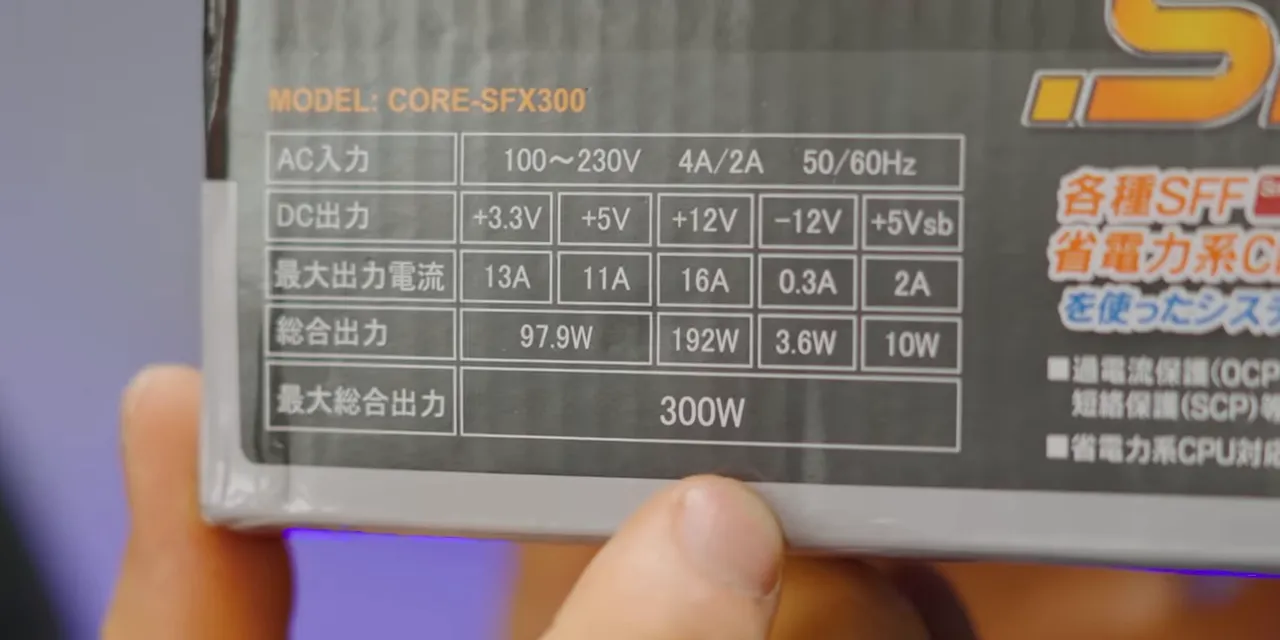
That distribution felt more appropriate to a much older PC than a modern gaming machine. The unit also lacked active power-factor correction. At approximately $28, it was cheap, but our price comparison still suggested we had overpaid.
The installation introduced another mismatch: the PSU supplied a four-pin CPU power connector, while the motherboard had an eight-pin socket. We installed the four-pin connector and left the remaining positions empty. The system later ran, but this is exactly the sort of compatibility compromise you should identify before buying parts, not while trying to finish a build.
The airflow problem was built into the case
Getting the power supply and optical drive into place required working out the correct assembly order. An initial attempt suggested the optical drive needed to go first, then the PSU. A removable section eventually explained some of the awkward screw access, although the included miniature screwdriver barely managed its own screws anyway.
The bigger concern was airflow. The PSU could draw fresh air through a case vent, but its exhaust faced into a cramped internal space near a solid panel and a coiled extension cable.
Fresh air in. Hot air... somewhere in there. Brilliant.
The 240GB SSD Was a Bargain, Right Until We Used It
Storage came from a familiar name, at least in the context of our questionable-shopping experiments: the Vaseky V800 240GB SATA SSD. We had bought the same model for the previous Wish PC.
Its label expanded SSD into “solid SATA drive.” Not quite, but points for enthusiasm.
The enclosure popped open without tools, revealing a tiny circuit board with a controller and NAND packages that had no recognizable branding. There was no separate DRAM chip.
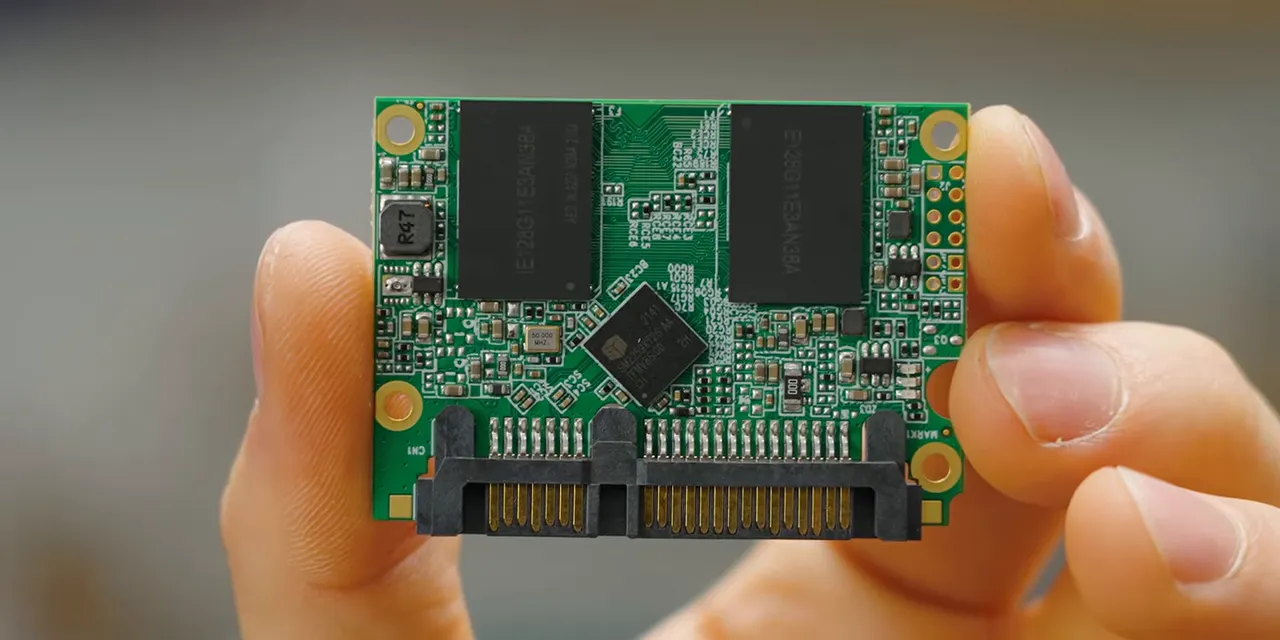
This time, the drive cost about $21, versus roughly $56 for our earlier purchase. With inexpensive 240GB drives available in North America for around $24 at the time, we had finally found something that could plausibly be called a deal.
A small deal. On an SSD I would not trust with anything more important than a replaceable Steam library.
The mounting position did it no favors, either. The SSD sat immediately above the internally mounted power supply, close to where the PSU dumped its hot air. We did not conduct a long-term endurance test, but it was hardly an arrangement that inspired confidence.
“Four-Pin” Fans and a Graphics Card That Was Actually Real
Molex is not PWM
Our two HXS 80 mm fans cost $4.95 combined. Their clear plastic looked extremely cheap, but at that price, fine. Spin around, move some air, we will call it a day.
The listing, however, advertised four-pin PWM fans. What arrived used large four-pin Molex power connectors. Yes, technically there were four pins. No, that is not what a PC builder means by a four-pin PWM fan.
These fans would simply run at full speed in this configuration rather than offer the advertised motherboard PWM control.
Neither the fans nor the case supplied the screws needed to mount them. To keep the all-Wish rule intact, I reused twist ties from the PSU cables. One fan became an intake near the graphics card; the other became an exhaust.
We will call that an anti-vibration suspended mounting system. Very premium.
A low-profile GT 1030 for about $58
The graphics card was a Kuroutoshikou GeForce GT 1030 with a white PCB and a modest cooler. It included both low-profile and full-height brackets, which was important because the Buffoon case required the shorter one.
There was no DisplayPort output, but the card did eventually support a 1080p desktop at 120Hz.
At around $58, this was certainly not a powerful gaming GPU. But unlike our earlier Wish graphics-card experience, it was an actual GT 1030. That counts as progress.
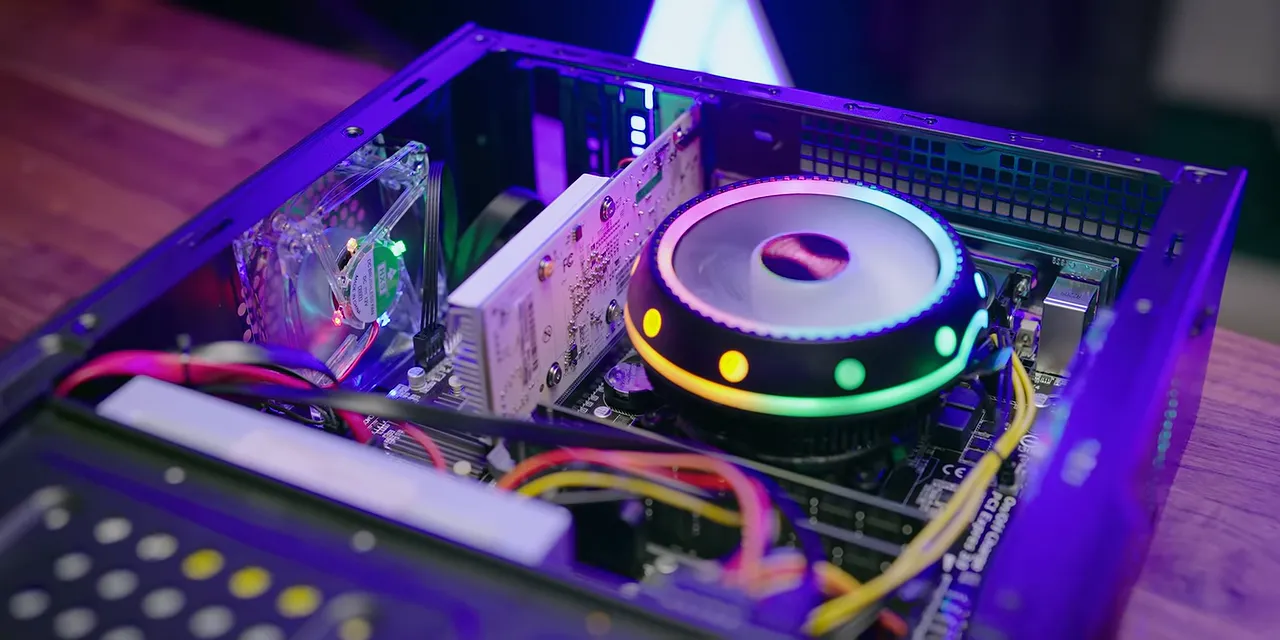
After connecting the motherboard power, SSD, optical drive, and SATA cables, the interior looked surprisingly respectable. Far from the worst computer I have ever assembled.
The $35 Peripheral Bundle Was Basically a Loot Box
The keyboard, mouse, mouse pad, and headset bundle cost $35.10. The listing displayed several different combinations, so ordering it felt less like choosing peripherals and more like opening a loot box.
We received a round-keycap keyboard, an illuminated mouse, a small printed mouse pad, and a headset that started coming apart during handling.
The headset was uncomfortable, its microphone was short, and its padding did not improve matters enough to save it. It had reportedly worked during an earlier check, but by the time we tested the completed machine, it produced static and popping rather than usable audio. Swapping connections and trying the rear I/O did not turn it into something worth using or repairing.
The case’s unlabeled front audio jacks made troubleshooting more annoying than necessary.
The keyboard and mouse had multicolored lighting. The keyboard even looked reasonably attractive once illuminated. Unfortunately, pressing its keys was exactly as unpleasant as its construction suggested, possibly worse.
At $35, a functioning bundle might have been defensible. With a failed headset, an awful keyboard, and a mouse whose worst behavior was still to come, the value proposition fell apart pretty quickly.
It Booted, but the SSD Became the Bottleneck
The system powered on. The CPU cooler lit up, the case fans displayed several colors, and Windows worked. The lighting was not meaningfully controllable, but it did contain red, green, blue, and even orange. Technically, a colorful success.
The optical drive supplied a less useful lesson: do not move or rotate a computer with a disc spinning inside it. The alarming noise that followed was entirely avoidable.
Hardware identification delivered some genuinely good news:
- The CPU identified as the expected Core i5.
- The graphics card identified as a real GeForce GT 1030.
- The 16GB of DDR3 operated in dual-channel mode at 1600 MT/s.
- The CPU sat around 60°C at approximately 70% utilization during our check.
That temperature was not a full-load thermal benchmark, but it was a respectable showing for the little Coolmoon cooler after all the drama.
The SSD was another story. While downloading and installing a game at roughly 28 to 30MB/s, the drive reached 100% utilization. The processor was not especially busy because storage had become the limiting factor.
This was not a controlled sequential-write benchmark, so that number should not be treated as the drive’s universal maximum transfer rate. It was, however, a very real example of the machine bogging down during an ordinary task.
Saving a few dollars on storage becomes a lot less exciting when you are immediately waiting on it.
Gaming: High Frame Rates Cannot Fix a Bad Mouse
Our 1080p Team Fortress 2 session initially looked promising. The frame-rate counter reached around 200 FPS. For an old Core i5 and a GT 1030, that was an encouraging start.
Then came the stuttering and skipped turns.
Fast mouse movements repeatedly failed to translate into the rotation I expected. At first it was difficult to separate game-engine stutter from input problems, but the tracking behavior was plainly bad. Try to turn quickly, and sometimes the response simply was not there.
That distinction matters. A PC can produce a high frame-rate number and still deliver a miserable gaming experience if the input device cannot keep up. Add missing audio and an unpleasant keyboard, and the RGB stops feeling like much of a consolation prize.
No kills. No win. A very convenient computer to blame, admittedly.
The Verdict: Cheap Parts Are Not Automatically Good Value
The total came to approximately CA$530, or US$420 at the time. All prices here reflect this build, not current shopping recommendations.
For that money, we got a functioning older PC with genuine core components, a surprisingly well-aligned chassis, and acceptable temperatures during a partial-load check. Those are real improvements over a fake GPU and a dead PSU.
We also got poor packaging, questionable accessories, misleading fan specifications, an awkward power-supply layout, slow storage behavior, a failed headset, and a mouse that made aiming an optional feature.
The lesson is not that every inexpensive or unfamiliar component is automatically bad. Several of these parts did what they were supposed to do. It is that the complete build offered too many compromises for the money. A low-profile case that restricts your GPU choices, a PSU with limited 12V output, and peripherals you immediately want to replace all count toward the real cost.
Compare exact specifications, check physical compatibility, read the power-supply label rather than just its headline wattage, and judge the whole system rather than individual listing prices. The build discussion provides a place to dig further into this particular collection of decisions.
Wish delivered the hardware faster this time. It just did not deliver a compelling reason to buy it there.
|


