Sometimes the appropriate response to a hosting bill is to load a bunch of servers into a rented Hyundai and announce that you’ll do it yourself.
For almost a decade, we’ve built and operated Floatplane on rented cloud infrastructure. And honestly? It’s been great. We could grow a robust, scalable video platform for ourselves and other creators without buying a mountain of expensive hardware upfront or taking responsibility for keeping all of it alive.
Our monthly bill gradually increased as Floatplane grew and we added internal tools for Labs and other departments. That was manageable. Then our host decided our already five-digit monthly bill needed to increase by about 40 percent.
We were not especially excited about that.
So now we’re building out our own colocation rack in Vancouver. That means taking ownership of the servers, networking, power distribution, backups, and all the little compatibility problems that make enterprise hardware such a delight. The goal isn’t just to escape a price increase. It’s to build infrastructure we control, with more horsepower and faster connections than we had before.
Why Colocation Instead of Putting Everything at the Office?
Our new home is Cologix VAN3, a carrier-neutral data center in Vancouver. Think of colocation as an extremely technically advanced storage facility: we rent the space, while the facility supplies infrastructure that would be painfully expensive to reproduce ourselves.
That includes redundant power, access to high-speed networking, cooling, and multiple layers of physical security. A generator alone can run around $35,000. Suddenly, renting a small patch of professionally managed floor space sounds pretty reasonable.
But renting a rack is not the same thing as renting a working cloud environment. Our blank slate comes with power and network hookups and roughly five square feet of floor space. The rest is on us:
- Rails and mounting hardware.
- Power distribution inside the rack.
- Routing and switching.
- Compute and storage servers.
- Backups and remote management.
We’re handing the building-level problems to a company equipped to handle them. We’re taking responsibility for what happens inside our rack.
Networking First, Because Nothing Else Matters Without It
The first things going into the rack are two Dell switches, each with 32 ports of 100-gigabit connectivity. Two switches give us redundancy, rather than making one box responsible for the entire rack’s network.
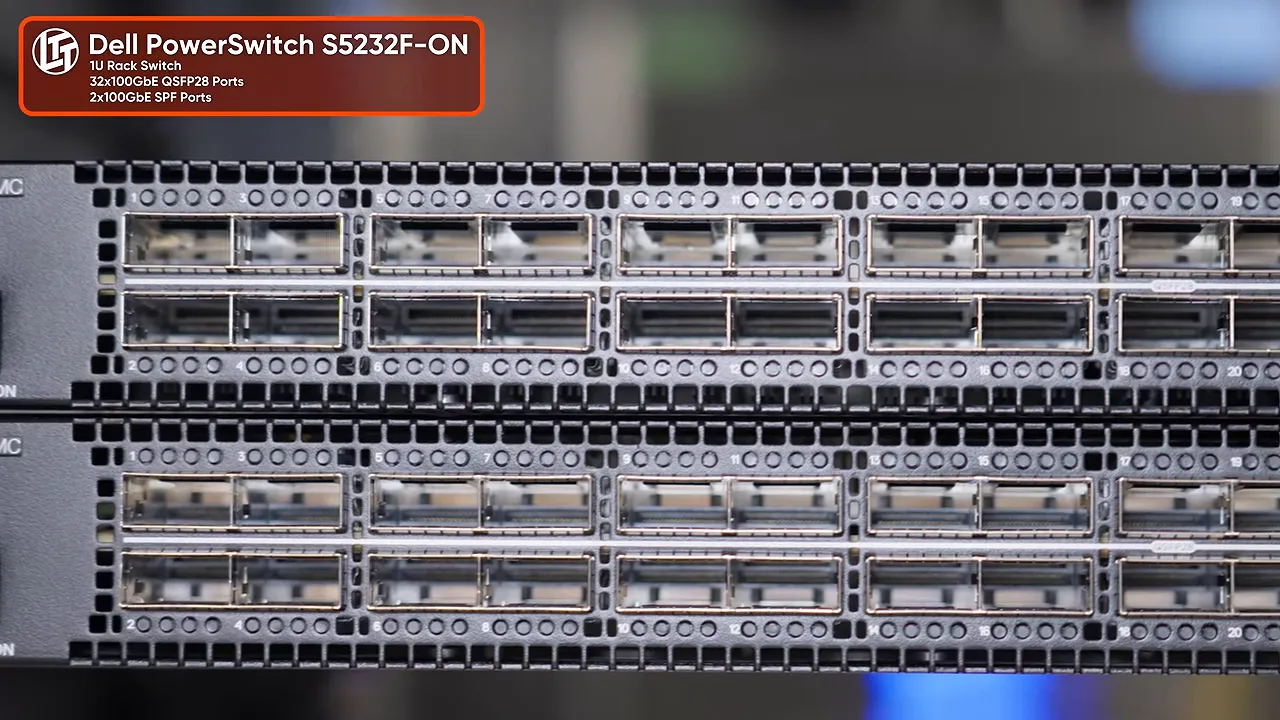
These are acting as our top-of-rack switches, but their ports face toward the server cabling side of the cabinet. That makes the connections easier to route. It also puts their airflow in the correct direction for the facility.
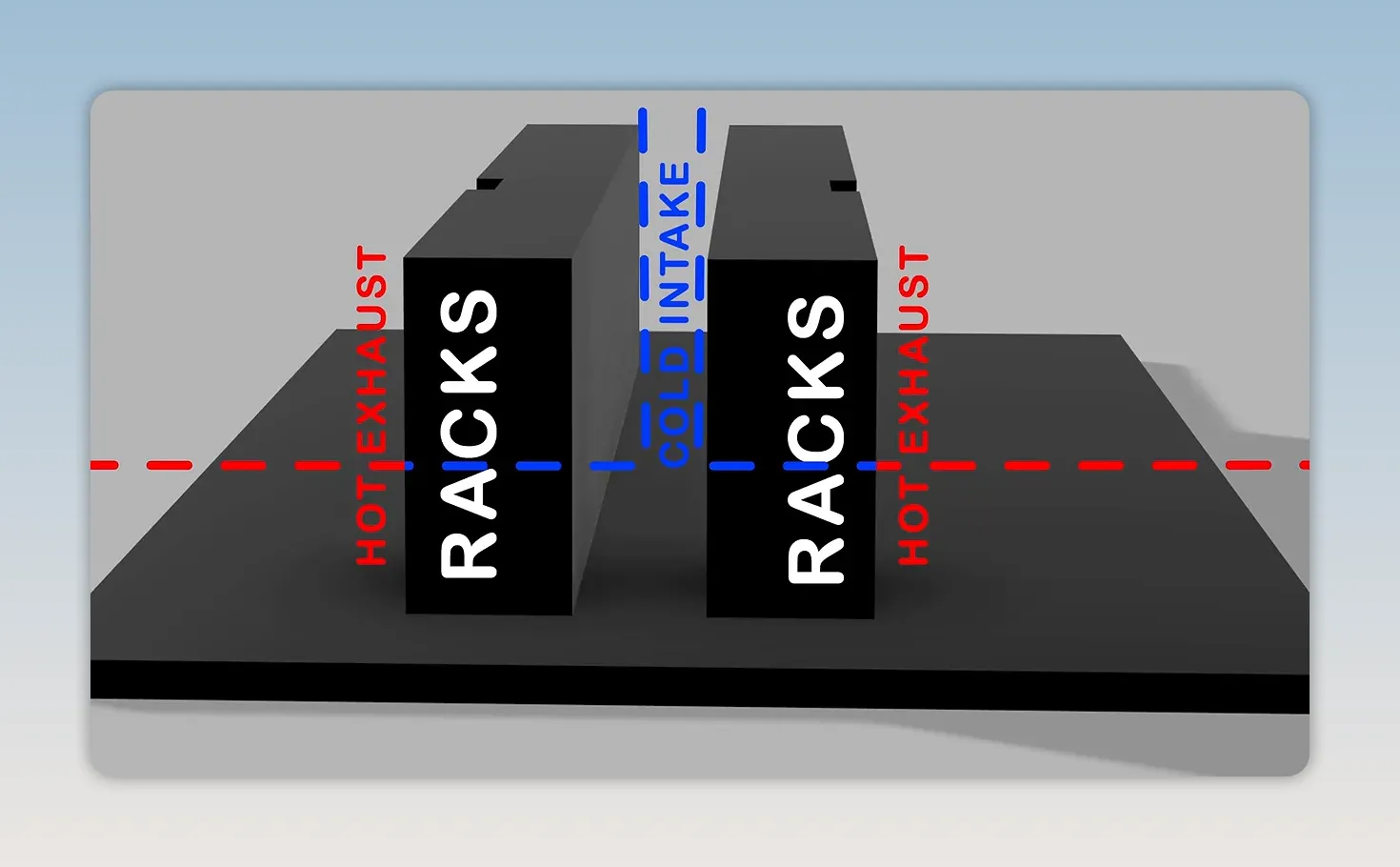
These particular models pull air from the side normally described as the back and exhaust it through the port side. Installing them without considering that would put their cooling at odds with the data center’s airflow arrangement.
Which way the ports face and which way the air moves are separate questions. Both need an answer before the switch goes into the rack.
There is, of course, a catch. These switches came out of our own production environment. For the moment, adding redundancy here means the office has lost some of its redundancy. Excellent. We have successfully relocated the problem.
They also have significant routing limitations for what we ultimately want to do. They’ll get us started, but the plan is to replace them with more appropriate switches down the road.
A Separate Network for When the Main Network Breaks
A redundant production network is useful. A way to reach the equipment when that production network is broken is useful in a completely different way.
That’s why we’re installing an out-of-band management network. It’s separate from the primary network carrying client traffic, so a failure in the main switches or internet connection doesn’t necessarily mean someone has to drive to the data center.
The idea is to enter through an independent connection, reach the management hardware, and make whatever changes are needed to restore service.
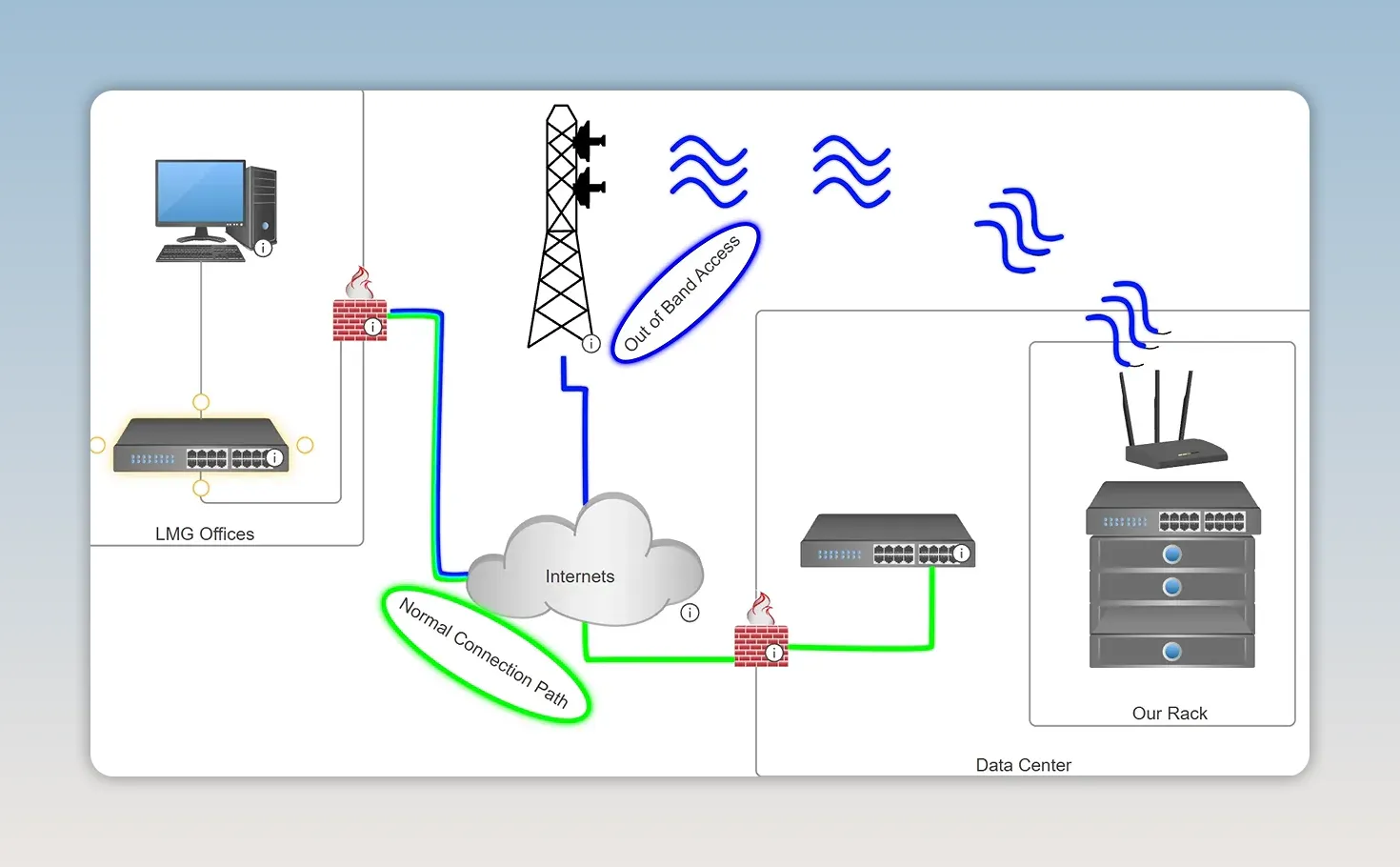
Our machine networking uses Cloudflare Zero Trust, with a node providing remote reachability into this environment. We’re also repurposing a UniFi Dream Machine Pro for the management network. Its support for WireGuard gives us another useful tool for securely connecting back to our network.
This isn’t the same use case as a consumer VPN service. We’re connecting infrastructure so we can administer it remotely, not choosing a different apparent location for ordinary web browsing.
For the independent uplink, we’re installing a UniFi 5G modem. If our main internet transit goes down, the cellular connection should still let us monitor equipment and make repairs remotely.
“Should” is doing some work there. The data center is a giant concrete box, and our rack is a giant metal box inside it. Cellular reception is something we need to verify, not assume.
Six Server Nodes, With Room Reserved for Failure
Next comes the heavy stuff. Literally.
We’re reusing a four-node Supermicro server chassis that previously served another redundancy role in our infrastructure. Before lifting it into the rack, we remove some of its individual nodes to make the chassis less ridiculous to handle. Once the enclosure is mounted, the nodes slide back in.
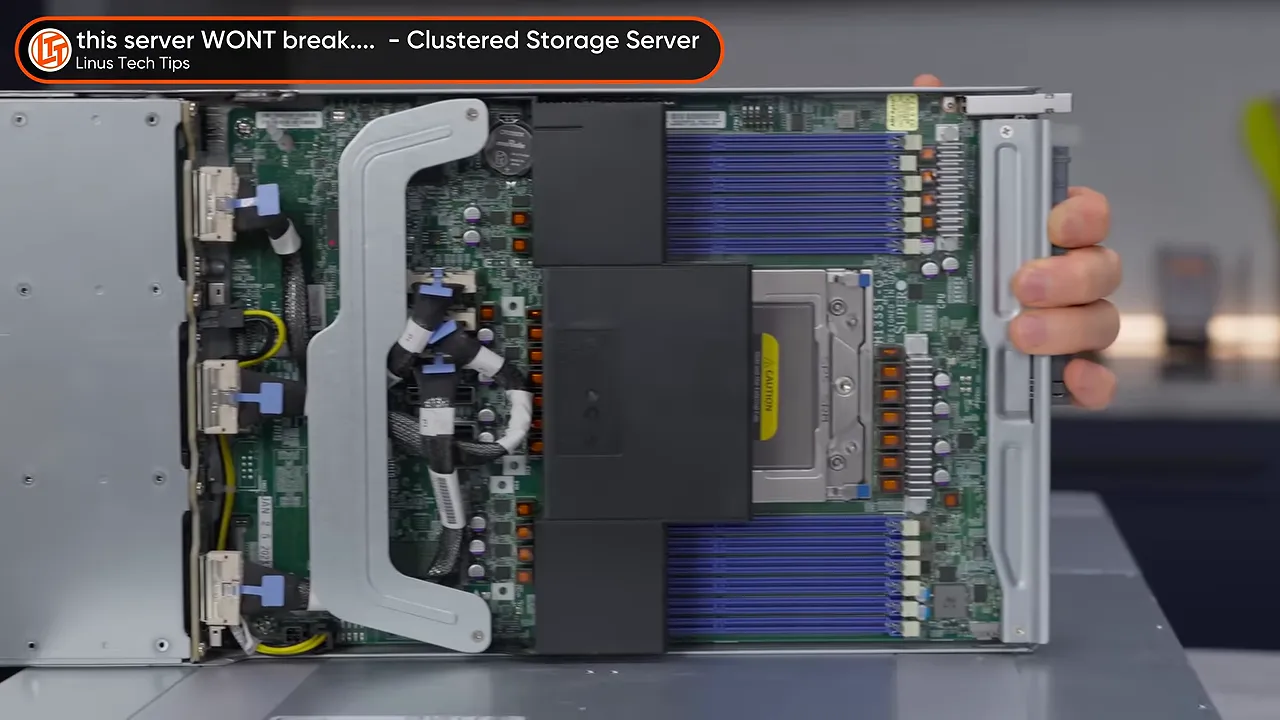
The virtualization platform is XCP-ng, which lets us manage the hosts as a pool of resources for virtual machines. The four nodes in the shared chassis, plus two additional servers, give us six nodes to work with.
That doesn’t mean every application magically becomes one enormous six-server computer. It means we can place and manage workloads across the hosts, while planning capacity around failures.
For the four-node group, the approach is to use roughly three nodes’ worth of capacity and reserve one node’s worth for redundancy. It’s tempting to call four servers “quad redundant,” but that would ignore how much work we’re asking them to do.
Spare capacity is what makes failover possible. Filling every host to the limit and then hoping the remaining machines absorb a failure is not much of a plan.
The two additional rack servers add a lot more compute capacity. One of these monsters has two 96-core AMD processors and 1.5 terabytes of RAM. That’s 192 CPU cores in a single server, which is enough counting for one installation day. The additional server capacity will also support backups and other services.
Storage is part of the build too, including a factory-recertified 26TB Seagate hard drive. Even that drive still cost around $800. Apparently “we’re saving money” and “this single hard drive costs $800” can both be true.
Red and Blue Power Cables Are Doing Actual Work
Most of this equipment has redundant power supplies, and we’re using red and blue power cables to keep the two power paths visually distinct.
The building supplies multiple power feeds. By connecting the two power supplies in a server to different feeds, we can keep it running if one side loses power.
The color coding also helps with maintenance. If we need to reroute or tidy the blue cables, we can work on that side while the red side keeps the equipment powered. Then we finish the blue side before touching the red.
The important part isn’t the colors themselves. It’s keeping the independent feeds identifiable and maintaining one working power path while changing the other.
Cologix also monitors each rack’s power consumption and the temperatures of air entering and leaving it. That information lets the facility adjust cooling airflow as demand changes, rather than pushing the same amount of air all the time.
A data center consumes a lot of electricity. If it can avoid spending extra power on cooling when the load doesn’t require it, great.
Connecting the Rack to the Office
Initially, the office and colocation environment will communicate over a VPN. The longer-term plan is a direct Layer 2 connection between the two locations.
We’re not purchasing a dedicated strand of fiber from end to end. We’re renting a wavelength, effectively a portion of a fiber’s optical capacity. The planned connection is up to 10Gbps, with the possibility of moving to 100Gbps if we need it.
For our internal users, the result should feel much closer to accessing equipment at the office than reaching a separate remote site through a VPN. Technically, this is a metropolitan-area connection, but the useful part is the direct network access between locations.
This also ties into our Linus ISP project. We plan to provide the office’s internet connection through the data center, while retaining other connections for redundancy. Since the office currently has three internet connections, there’s an opportunity to consolidate some spending without putting everything on a single connection.
Those are plans, not completed savings. The direct link still needs to be delivered and integrated.
Making the Cables Agree With the Switches
Enterprise networking would be far too straightforward if every compatible-looking cable simply worked.
With these Dell switches, we have to pay attention to how our direct-attach copper cables identify themselves. We’re using programmable Flexoptix DACs and a Flexoptix programmer to configure their identification for the switch.
In less formal terms, the cable needs to introduce itself as the sort of cable the Dell is willing to talk to.
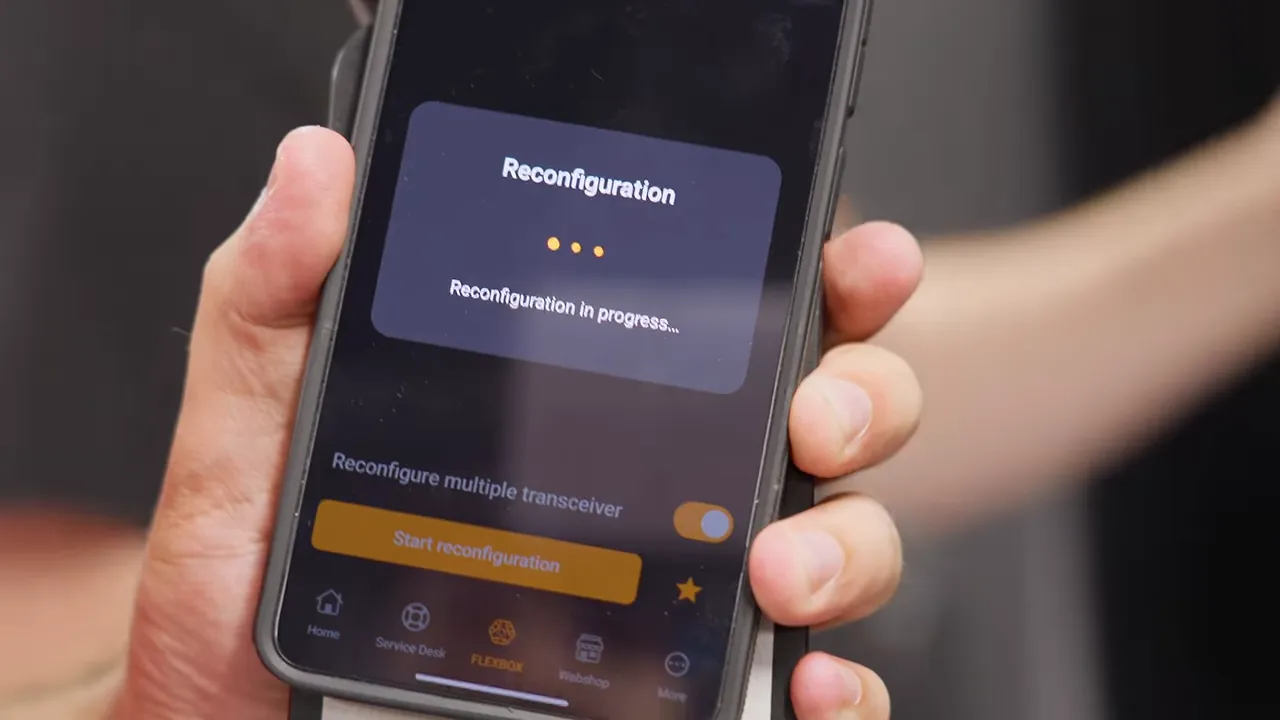
Once programming completes, we can plug the cable into the switch. It’s a small deployment detail, but exactly the kind of thing that can turn a supposedly simple installation into a troubleshooting session.
We’re also using an MPO fiber connection, which groups multiple fibers into one connector. The arrangement shown carries eight optical signals over eight fibers and supports breaking a high-speed port into four lower-speed links.
Depending on the optics and configuration, that breakout can provide four 10Gbps or four 25Gbps connections. It gives us flexibility to connect equipment without consuming an entire high-speed port for each lower-speed link.
Peering With Cloudflare Through VANIX
One of the advantages of being in a carrier-neutral data center is access to other networks. We’re connecting to VANIX, the local internet exchange, so we can establish BGP peering with participating networks.
Cloudflare is an especially useful potential peer for us because so much of our traffic already involves its services.
Rather than sending that traffic through a general internet transit provider, direct peering lets our network exchange it with Cloudflare over the exchange connection. It’s still network traffic, obviously. We’re just giving it a more direct handoff instead of paying a transit provider to carry it along the usual route.
For cost-optimized connectivity, we’re using bidirectional optics. Each fiber strand carries both transmit and receive traffic, rather than requiring a separate strand for each direction. That lets us use the available strands for connections to both switches.
The other end of those fibers connects into VANIX’s infrastructure. From there, the routing and peering configuration determines which networks we exchange traffic with.
The Real Workload: More Than a Thousand Containers
The rack isn’t here just to look impressive or give us something expensive to lift.
We already run more than a thousand containers, including Kubernetes workloads hosted at OVH and databases supporting Labs. Those services are part of what we intend to migrate into this environment.
There’s potential for a performance improvement, too. We expect more host processing power and better drives, while server networking is moving from 25Gbps to 100Gbps. That’s four times the nominal link bandwidth, although it doesn’t mean every application automatically becomes four times faster.
The extra resources should give us more flexibility in assigning workers and running the mix of services our departments need.
For now, the priority is getting the initial infrastructure installed and configured. Cable tidiness, consistent color choices, optimization, replacement switches, and the actual workload migrations will continue afterward. We have limited time with AJ on site, so making the rack useful comes before making every cable beautiful.
A 40 percent hosting increase got us here. What we’re building is a different tradeoff: less dependence on rented compute, more control over our hardware, and considerably more responsibility for keeping it all working.
Sometimes doing it yourself is the better option. It just turns out “yourself” also needs redundant switches, two power feeds, cellular management access, a virtualization cluster, and somewhere to put all of it.
Sponsor: Snapmaker U1
Snapmaker sponsored this project. Its U1 multicolor 3D printer uses four separate toolheads, keeping different colors or materials ready and switching between them in about five seconds. Separate nozzles reduce the need to purge material during color changes, helping more filament end up in the print rather than the waste bin. Snapmaker Space also provides designs for people who would rather start printing than design everything from scratch.
The Black Friday offer promoted alongside this project reduced the U1 from $999 to $699, a $300 discount.


