Guang Hua Digital Plaza in Taipei is six stories of tech treasure, with shops packed floor to ceiling with components, accessories, computers, and just about anything else that can consume electricity. It is flipping amazing. But does that make it a good place to buy a custom gaming PC?
I decided to find out by walking into a small shop, handing over a roughly US$5,000 budget, and giving the builder almost complete control. The assignment: make it ridiculously good-looking, give it hardline liquid cooling, and make it play games at 4K.
The catch? I would pretend I knew absolutely nothing about computers. No carefully selected parts list. No technical interrogation before paying. Just a customer with money and a whole lot of trust.
The Challenge: Boutique Looks Without Boutique Compromises
The inspiration was a display of custom liquid-cooled systems. Commissioning something like that back home can get expensive fast.
For context, the Maingear Apex Rush configuration I used as a reference started at around US$5,000 with hardline cooling. At the time, that configuration paired an RTX 4080 Super with a Core i5, 16GB of memory, and 512GB of storage.
I know Maingear makes good stuff, but 512GB at this price? Who do you think you are, Apple?
That gave our little mystery-shopping experiment a useful benchmark. Could a small Taiwanese shop deliver the craftsmanship of a boutique system while putting more of the budget into the hardware?
Step One: Give the Builder a Budget and Play Dumb
I introduced myself and explained that I already had a monitor. All I needed was a PC capable of running the best games at 4K, really, really fast.
The budget was NT$170,000, approximately US$5,200 at the exchange rate used during the trip. And I wanted the rigid tubes, not the floppy ones. That was about as technical as I allowed myself to get.
I had worried about a language barrier, but the shopkeeper spoke great English. Better still, he said he had personally built the impressive demo systems that had brought us to his shop.
He showed examples of previous themed builds, including Iron Man and Cyberpunk systems. I did not need a theme. A clean, attractive build would be perfect. Oh, and could it be ready by Friday?
That gave him three days.
He offered to send a parts list and a price. I explained that I would not understand the components anyway, so he would have to tell me what was good.
There was a point to all this beyond making myself sound like an idiot. The real test was how the shop would treat a customer who could not easily judge its recommendations. It is easy to do the right thing when someone is checking your work. What happens when they are not?
A Surprisingly Personal Ordering Experience
The follow-up was excellent. The builder took my number, sent photos of systems, and asked about my preferences. White or black? Which brands did I like? AMD or Intel?
I expressed a preference for white, but kept pushing the component decisions back to him. Which processor should I get? You tell me. What brand is good? I am trusting you.
That kind of direct conversation felt refreshingly personal. There was no endless configurator or support queue. Just a builder asking what kind of machine I wanted and texting me examples.
Step Two: Actually Pay for the Thing
The quote came back at NT$167,000, approximately US$5,159.50. Within budget. Time to pay.
This was the stressful part. I did not know my work credit card limit, and explaining a large foreign-currency computer purchase to accounting was going to be interesting. Particularly because I had absolutely no sensible way to take the computer home.
One bank flagged the overseas transaction. Another card worked. A tap, a signature on a touchscreen, and an alarming amount of money was gone.
Now we just had to find out what we were getting in return. And eventually find somebody in Taiwan who wanted a computer.
Three Days Later: A Finished Custom Loop
He actually finished it in three days.
That surprised me because a build like this needs more than ordinary PC components. Water blocks, fittings, mounting hardware, and a high-end graphics card all need to be available. Small shops back home often carry very little inventory at this level.
The builder said his shop assembled around four to five systems a day, although presumably not all of them were elaborate custom-loop monsters.
When we arrived, the PC was running a test suite, including thermal testing. It looked fantastic. He confirmed a one-year system warranty and said I could still find him for help years down the road. He also invited me to contact him through LINE if anything went wrong.
All the accessories were packed up, too. Apart from some confusion over my request for a receipt, it was about as boutique an experience as I could reasonably expect.
Well, almost. A cart would have been nice. The builder estimated the system at about 40 kilograms, or 88 pounds. Choosing a shop on the fifth floor suddenly felt like poor planning.
The Build Quality Was Ridiculously Good
The packaging made a strong first impression: double boxing, a protective bag, and substantial closed-cell foam. I would still be cautious about shipping a machine this heavy, but the materials were much better than some token pieces of packing foam.
Then the system came out of the box.
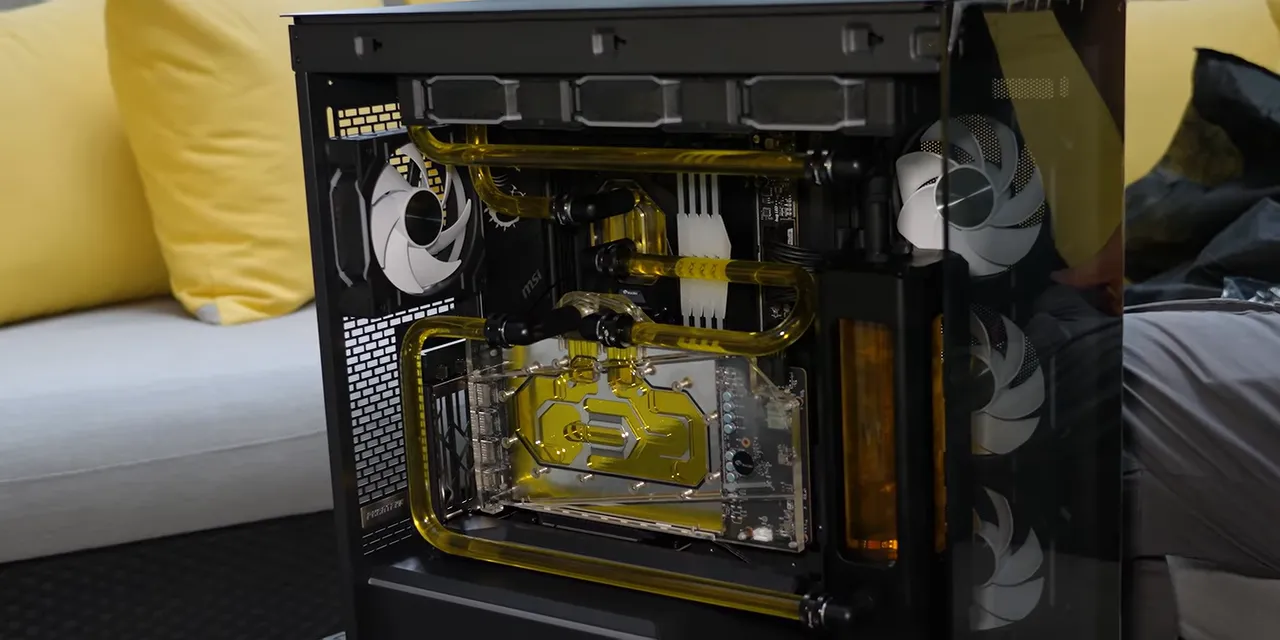
Inside the Phanteks NV5 was an exceptionally tidy hardline loop, with Bykski cooling hardware and carefully aligned runs of tubing. Bykski might once have been dismissed as a budget water-cooling brand, but nothing here looked out of place.
The bends were outstanding. A U-shaped section is particularly unforgiving because the spacing between its legs has to be right. You can trim an end to adjust a straight run, but you cannot casually change the distance inside a completed U-bend.
Here, the tubing sat beautifully parallel to the case and the neighboring runs. The builder had also used spacers to align the reservoir connection with the GPU connection.
Those are little details, but they matter. They cost time, money, or both.
- Vertical GPU mounting: The builder included the mount rather than pocketing the savings.
- Reverse-direction fans: The visible fan faces stayed consistent without abandoning the intended airflow direction.
- Clean cable management: Removing the rear panel did not reveal a hidden disaster.
- A substantial power supply: A fully modular Seasonic Vertex 1200W unit avoided another obvious opportunity to cut costs.
I went looking for flaws and initially found protective film still attached to some fan surfaces. Apparently, this is a feature if you ask my camera operator. I prefer my peels removed.
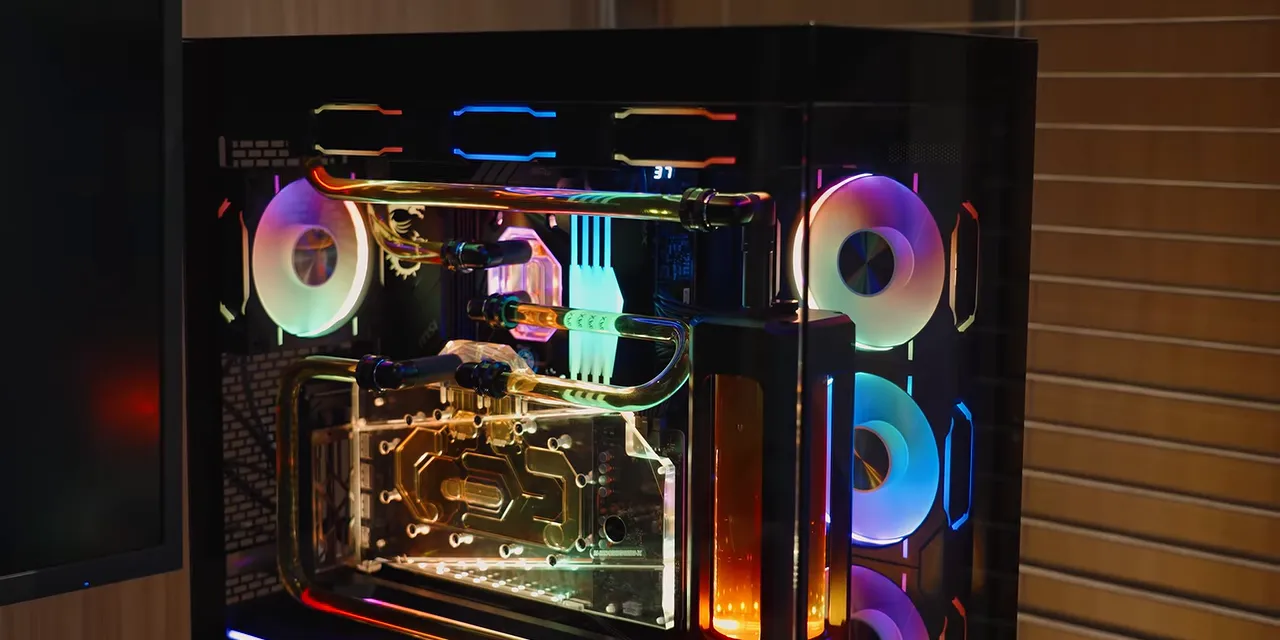
Once powered up, the RGB lighting made the whole thing even better.
What Hardware Did $5,000 Actually Buy?
Good craftsmanship is one thing. Maybe the catch was hiding in the specifications?
Using the preinstalled AIDA64 Extreme trial, I checked the hardware. Yeah, no. The reference Maingear configuration was in trouble.
- CPU: AMD Ryzen 9 7950X3D, a flagship-class processor at the time.
- GPU: MSI GeForce RTX 4090 Gaming X Trio 24GB, fitted with a Bykski water block.
- Motherboard: MSI MPG X670E Carbon WiFi.
- Memory: 64GB of XPG Lancer RGB DDR5, supplied as two separate 2 x 16GB kits rated for 5600 MT/s.
- Storage: Two 2TB Acer Predator GM7000 NVMe SSDs, totaling 4TB.
- Operating system: A legitimate copy of Windows 11, with its packaging included.
Against the specific Maingear starting configuration I had priced, that meant a much higher-end CPU, an RTX 4090 instead of a 4080 Super, four times the installed memory, and eight times the storage capacity.
That is a spectacular difference on paper. Unfortunately, the words “on paper” were about to become relevant.
The Setup Mistakes: Storage and Memory
One SSD Was Not Ready to Use
The second SSD was installed, but it had been left uninitialized. Windows could detect it in Disk Management, but it was not configured as usable storage.
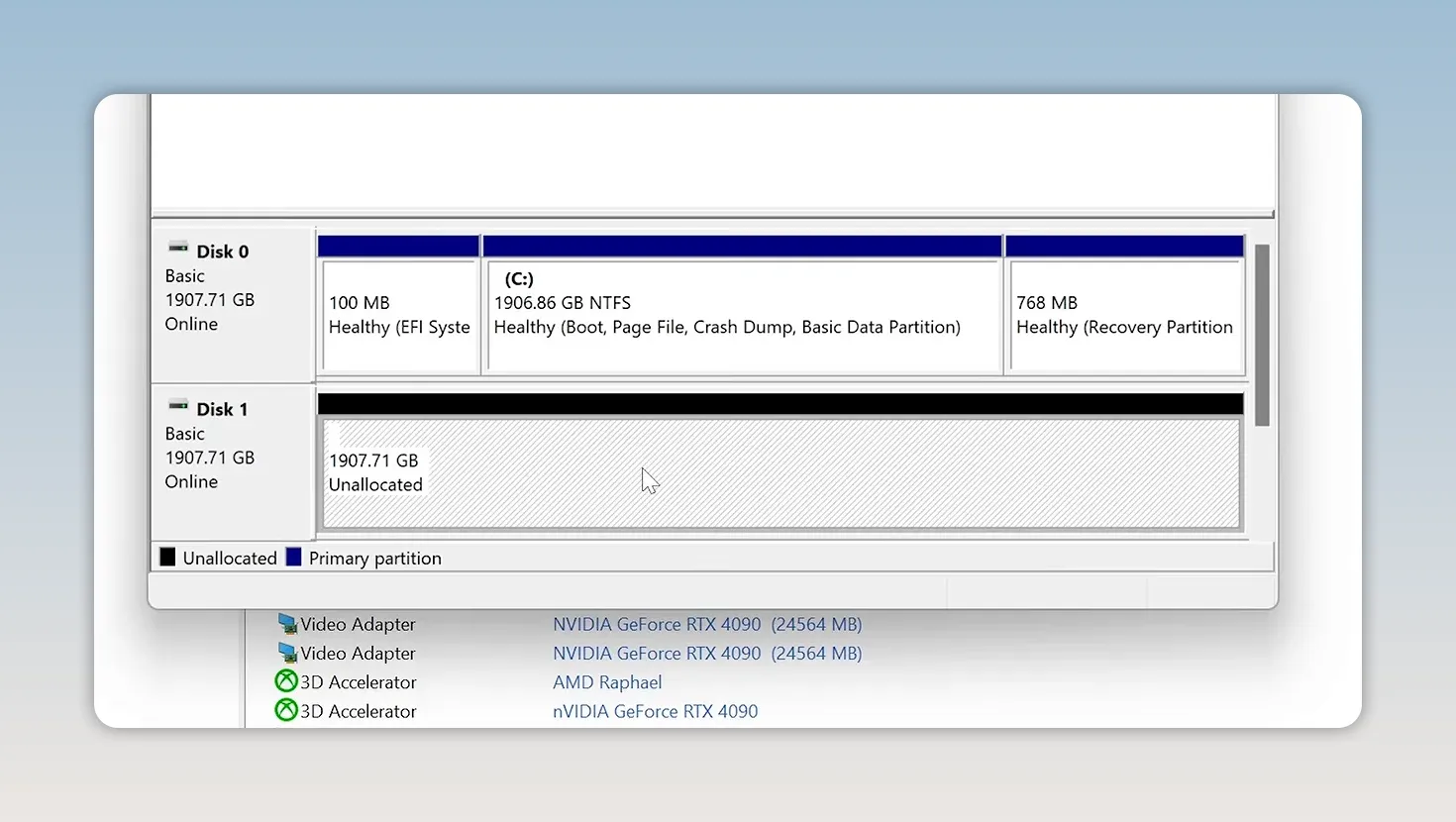
That is sloppy on a finished premium PC. It is considerably better than not receiving the drive, but a nontechnical customer should not have to finish the storage configuration themselves. Microsoft’s guide to initializing a new disk explains the process, but this should have been handled before pickup.
The Bigger Problem: 64GB Running at 3600 MT/s
The memory was running at just 3600 MT/s, with EXPO disabled. That is very slow for this Ryzen system, especially when the modules were sold with a 5600 MT/s profile.
To the builder’s credit, the BIOS was up to date. But enabling EXPO did not produce a straightforward successful boot.
My first thought was to remove half the memory. Two sticks would still give us 32GB, twice the capacity of the reference system, and might be easier to run at the rated speed.
Even that did not immediately work. Also, those beautiful water tubes made accessing the DIMMs rather less beautiful.
Then I noticed something I had not needed to care about in years: the modules from the two separate memory kits had been mixed between the paired slots.
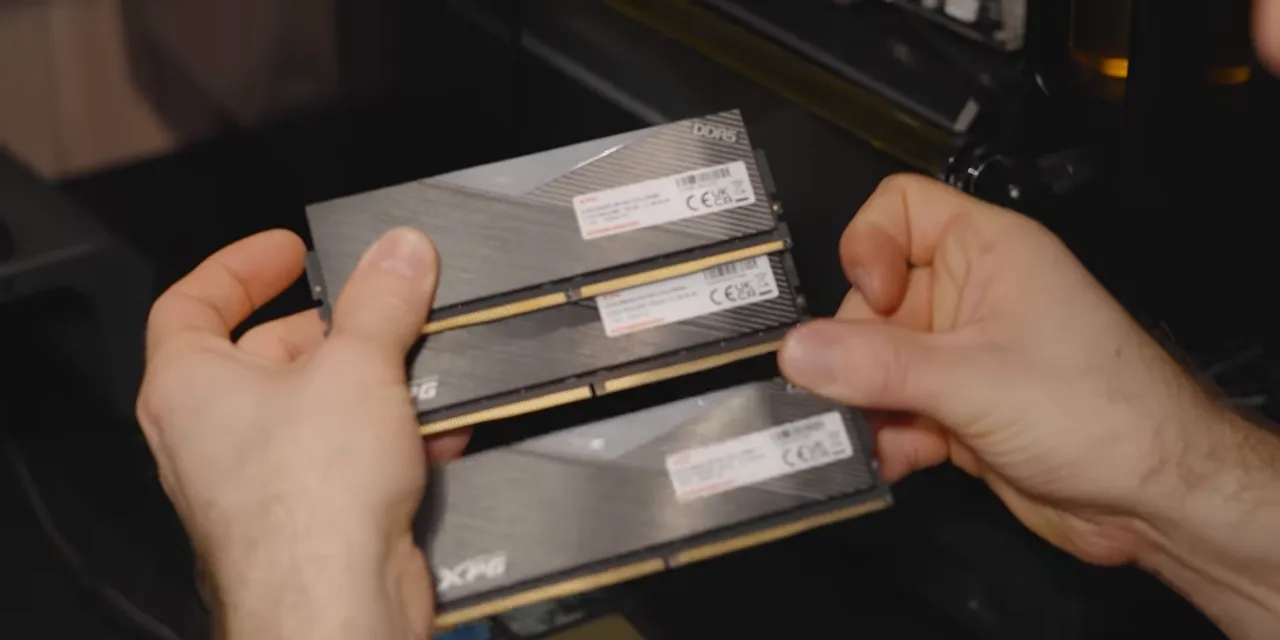
The serial numbers let me work out which sticks had shipped together. Mixing kits does not always cause problems, but differences between the modules can create compatibility issues, particularly at higher speeds.
With a correctly matched pair installed, the system booted at 5600 MT/s. Putting the other two modules back in still failed to deliver the result we wanted. We ultimately settled on 32GB at 5600 MT/s, rather than leaving all 64GB running at the original slow setting.
That is an important qualification to the impressive parts list. The machine arrived with 64GB, but getting the rated memory speed required troubleshooting and giving up half the installed capacity.
I still considered the overall configuration a win. I was not thrilled that a customer would need to shuffle memory sticks around to get there. Memory speed can make a measurable performance difference on this platform, so this was more than a cosmetic oversight.
Software and Accessories: Mostly Excellent
The Windows installation was refreshingly free of obvious junk. It included testing and management utilities such as AIDA64, Ryzen Master, FurMark, MSI Center, and NVIDIA software. OBS was my addition.
I did later notice Google Chrome had been preinstalled. It is one of the first things I normally install myself, but adding a browser without asking is still a choice. The AIDA64 trial also deserved a raised eyebrow from a system-builder licensing perspective. Still, this was nowhere near the unwanted-software mess that sometimes accompanies a prebuilt PC.
The accessory handling was even better:
- The power cable was easy to find.
- Manuals and spare modular power supply cables were included.
- The original graphics card cooler had been returned.
- The screws removed during the GPU water-block installation had been put back into their corresponding locations in the stock cooler assembly.
That last detail was S-tier work. If the owner ever wants to restore the graphics card to air cooling, having the screws organized in their original positions makes the job substantially less miserable.
My only nitpick was the exposed thermal paste on the cooler. Covering it would help prevent a future handful of goop. But seriously, that is a tiny complaint next to how carefully everything else had been preserved.
Does It Actually Game at 4K?
After the memory troubleshooting, I ran FurMark alongside Prime95’s blend test for approximately ten minutes. Nothing crashed, and the GPU hotspot remained below 70°C.
That is a useful initial stress check, not a substitute for exhaustive long-term validation. But it was a good result.
Acoustically, the system was not especially quiet at idle. The upside was that it did not become noticeably louder under load, either. I considered that extremely acceptable.
Then came Counter-Strike 2: roughly 350 FPS at 4K during the gameplay we tried.
Casual.
That is not a promise of 350 FPS in every game or at every setting. It is, however, a pretty satisfying answer to the original request for a very fast 4K gaming PC.
The Verdict: Fantastic Value, Imperfect Validation
This was not a flawless build. The uninitialized SSD should have been caught. The memory configuration needed proper validation, and the final 32GB setup was a meaningful compromise from the 64GB originally installed.
But for the price, I was still extremely happy.
The craftsmanship was excellent, the core hardware was substantially better than the boutique starting configuration I had used as a reference, and the builder delivered the whole custom-loop machine in three days.
His communication was also exceptionally responsive. Possibly a little too responsive: he messaged at about 2:30 in the morning to ask whether I had set it up. Fair assumption that someone with a brand-new gaming monster might still be awake, but maybe we save that one for daylight next time.
It genuinely felt like he wanted to know whether I loved the system.
My experience supports this shop’s work, not a blanket endorsement of every store in the mall. There is also one uncertainty I cannot eliminate: the builder might have recognized me. He never made it obvious, but I cannot guarantee this was a completely anonymous customer experience.
Even with those caveats, this was a compelling demonstration of what a small specialist builder can deliver. The physical work was gorgeous. The final configuration checks were where it needed improvement.
One Last Problem: I Still Had to Get Rid of It
There was no way this thing was coming home in my luggage. So we carried it outside with a simple plan: the first person who recognized me and came over to say hello would get the computer.
Mainly, I did not want to carry it very far.
Eventually, someone stopped us on the street. He was delighted to meet me, then considerably more surprised to learn that the giant gaming PC was his.
We handed over the accessories and cables, and I offered cab money because his bicycle was not remotely equipped for this particular upgrade.
A small Taiwanese shop got to show off some seriously impressive work. Someone got a ridiculous new gaming PC. And I no longer had to haul it around Taipei. Pretty good outcome.
Sponsor: Vessi
Vancouver rain does not care that it is June. Vessi says its Dymotex technology keeps its shoes waterproof, and the Stormburst is also available in a low-profile version with a grippy rubber outsole. Use our sponsor link for 15% off your first purchase.


