A 115-inch television that costs roughly $31,000 needs to do more than be big. We have already established that manufacturers can make a screen large enough to become a structural feature of your house. The interesting question is whether the picture can justify the ridiculousness.
Sony’s Bravia 9 Mark II makes a pretty compelling argument. Its True RGB backlight delivers more than 90% coverage of the BT.2020 color gamut and nearly 4,700 nits of peak brightness in its recommended accurate HDR mode. Add remarkably controlled blooming, and the idea of putting something approaching professional mastering-monitor image quality in a home theater starts to feel a lot less far-fetched.
Perfect? No. There are some genuinely frustrating compromises, particularly for gaming. But for movies, this thing is ludicrous in the best possible way.
Quick Summary
- Professional HDR mode delivers 91.2% BT.2020 coverage and nearly 4,700 nits of peak brightness.
- Sony’s backlight processing controls blooming and color spill exceptionally well for a giant LCD.
- Gaming compromises include slow pixel transitions and mutually exclusive black frame insertion and variable refresh rate.
- The 115-inch model lacks the advanced anti-glare coating and cable-concealing stand found on smaller versions.
Table of Contents
- A TV This Big Is an Installation Project
- The Specs: Mostly Flagship, With a Few Asterisks
- What Sony True RGB Actually Does
- Setup: Please Just Let Me Use the TV
- Movie Performance: Color Without the Collateral Damage
- Blooming: Dimming-Zone Count Is Not the Whole Story
- Gaming: Here Come the Compromises
- Color Accuracy Backs Up the Wow Factor
- The Speakers Are Good. Budget for Better Anyway.
- The Verdict: An Extraordinary Movie TV, Not a Flawless Everything TV
- Sponsor: Learn to Code With Boot.dev
A TV This Big Is an Installation Project
Sony supplied an early loaner unit, complete with packaging that was very much not final. That distinction matters both for the unboxing experience and for some of the setup quirks we encountered later.
Still, there is no packaging revision that makes a 115-inch panel a casual two-person job. Sony provides four handles that screw into the sides, similar to the approach we have seen from TCL. They are useful, but the sheer span of the display makes every move awkward.
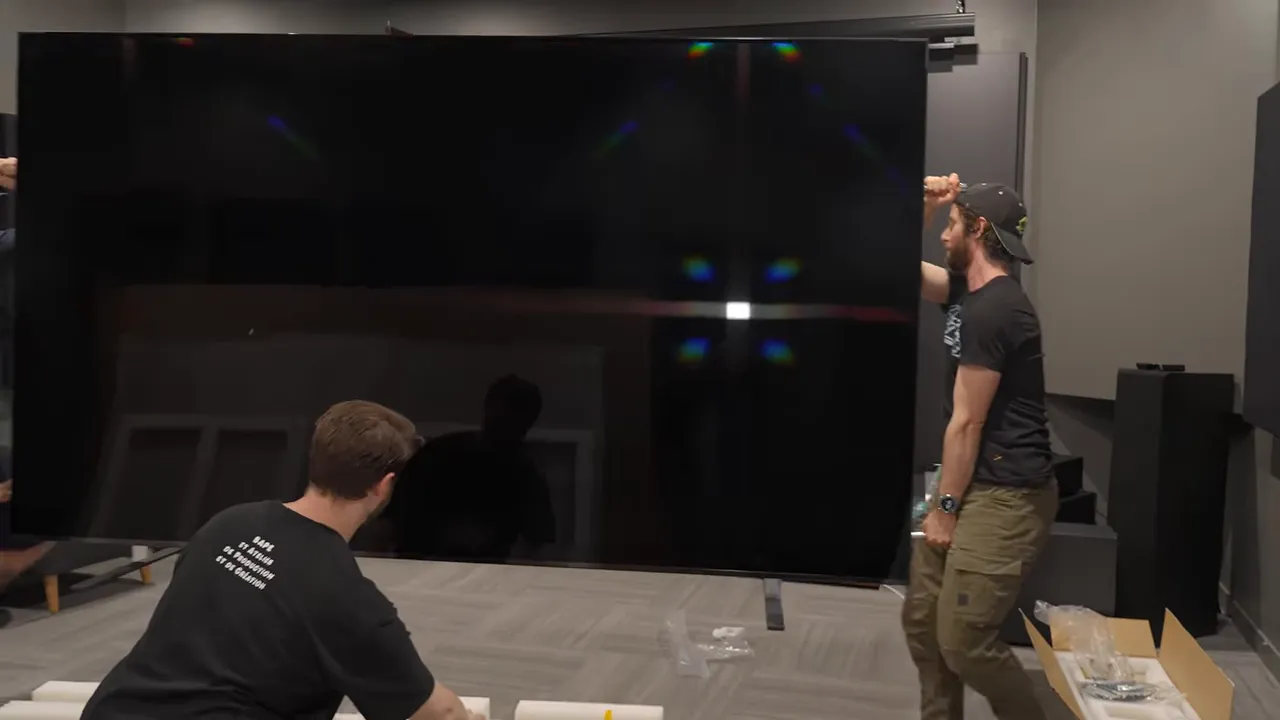
Our initial assessment was that moving it was about a three-person job. After actually doing it, the fourth handle started to make a lot more sense. Plan the installation carefully, give everyone room to work, and connect anything that will become difficult to reach before settling it into place. The power cord, for instance. Ask us how we know.
The biggest model does not get every feature
Spending the most does not automatically get you every feature available elsewhere in the family. Two omissions stand out on this 115-inch model:
- No next-generation anti-glare coating. The smaller models get the impressive coating Sony demonstrated at its unveiling. This one does not.
- No cable-concealing lenticular stand. Smaller versions have a stand that optically obscures cables routed behind it. The giant gets more conventional feet.
The missing anti-glare treatment is the bigger disappointment. A dedicated dark room can minimize the problem, but not everyone buying an enormous television is putting it in a purpose-built theater. Reflections still deserve consideration, even when the screen can get absurdly bright.
The Specs: Mostly Flagship, With a Few Asterisks
The Bravia 9 II is a 4K, 120Hz LCD television. That is perfectly reasonable for a PlayStation, which was Sony’s explanation for the refresh-rate choice. It is less exciting when competing high-end TVs offer 144Hz or even 165Hz. Other gaming devices do, in fact, exist.
The main features and connections include:
- Gaming support: Variable refresh rate and auto low latency mode.
- HDR formats: Dolby Vision, HLG, and HDR10, but no HDR10+.
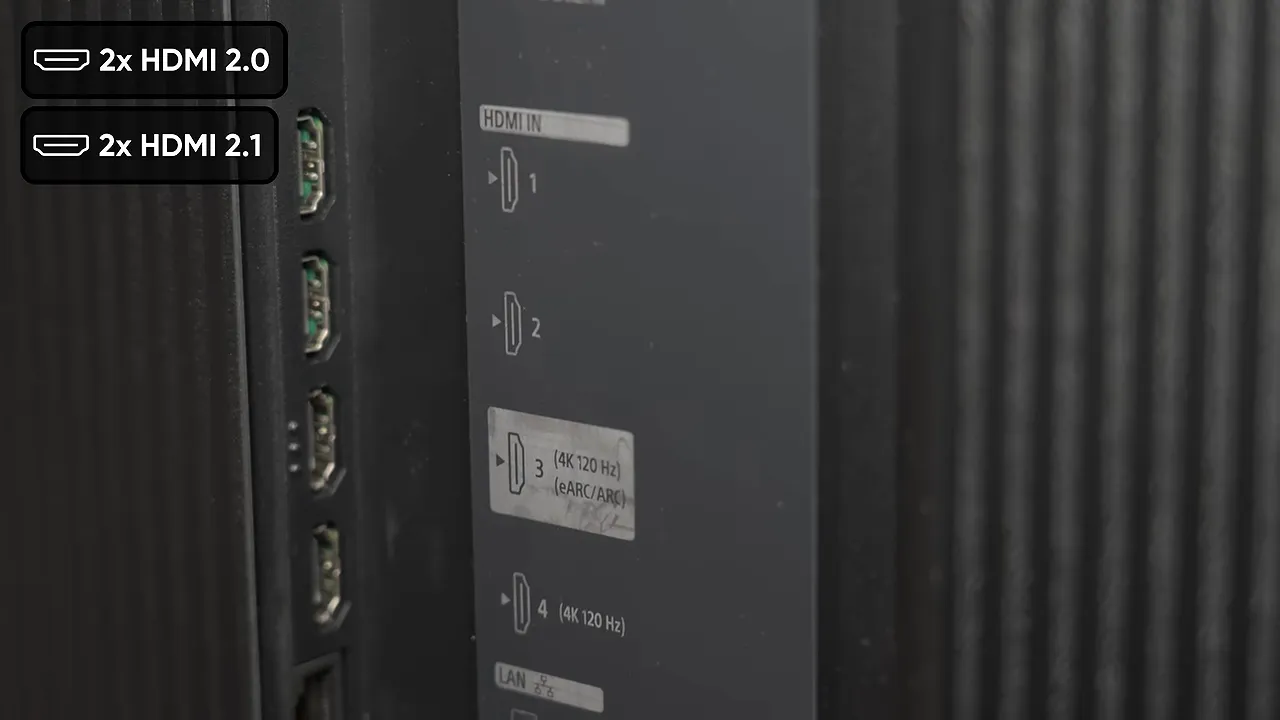
- HDMI: Four inputs, two supporting up to 4K at 120Hz, with eARC available on one input.
- Networking: Wi-Fi 6E and wired LAN. We did not establish the Ethernet port’s speed.
- Other connections: Two USB ports, optical digital audio output, RS-232C, IR input, and a cable/antenna connection.
- Power: An internal power supply rather than an external brick.
The HDR format situation remains annoying. We have previously found Dolby Vision to have a slight edge over HDR10+, but the practical problem is content availability. Not everything comes in both formats. Pick the television for its overall performance rather than one logo, absolutely, but a display at this price should ideally support both.
There is also support for using the TV’s speakers as the center channel in a compatible surround setup. That could make for a clean installation, although I would still choose a dedicated center speaker.
One small win: the remote is illuminated. At this price, that ought to be a given. Experience with expensive projectors and televisions has taught me not to assume it. It also has plenty of dedicated service buttons, including Sony Pictures Core, but no dedicated AI button. I am not complaining.
What Sony True RGB Actually Does
The important part of this television is not the diagonal measurement. It is the backlight.
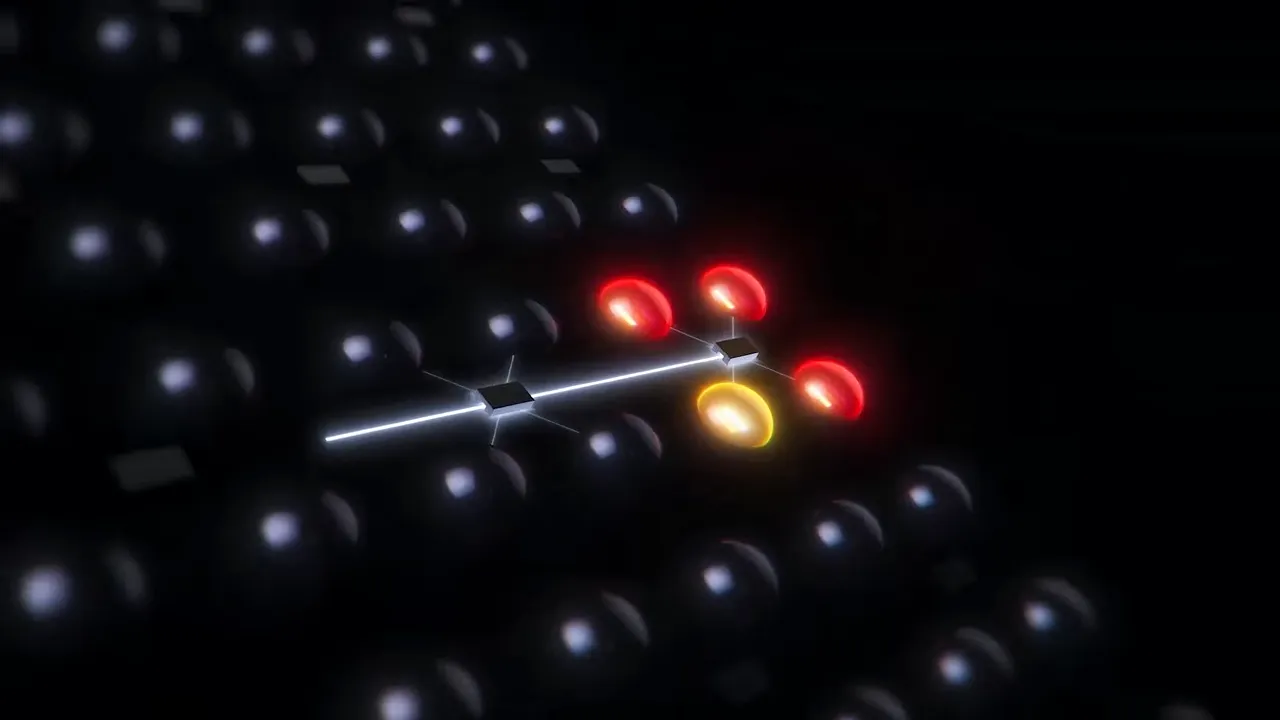
Sony’s True RGB technology uses independently controlled red, green, and blue light-emitting diodes to generate the backlight’s colors directly. This remains an LCD television, not a self-emissive RGB display. The front LCD layer still controls the image, but the light behind it has a much wider range of colors available.
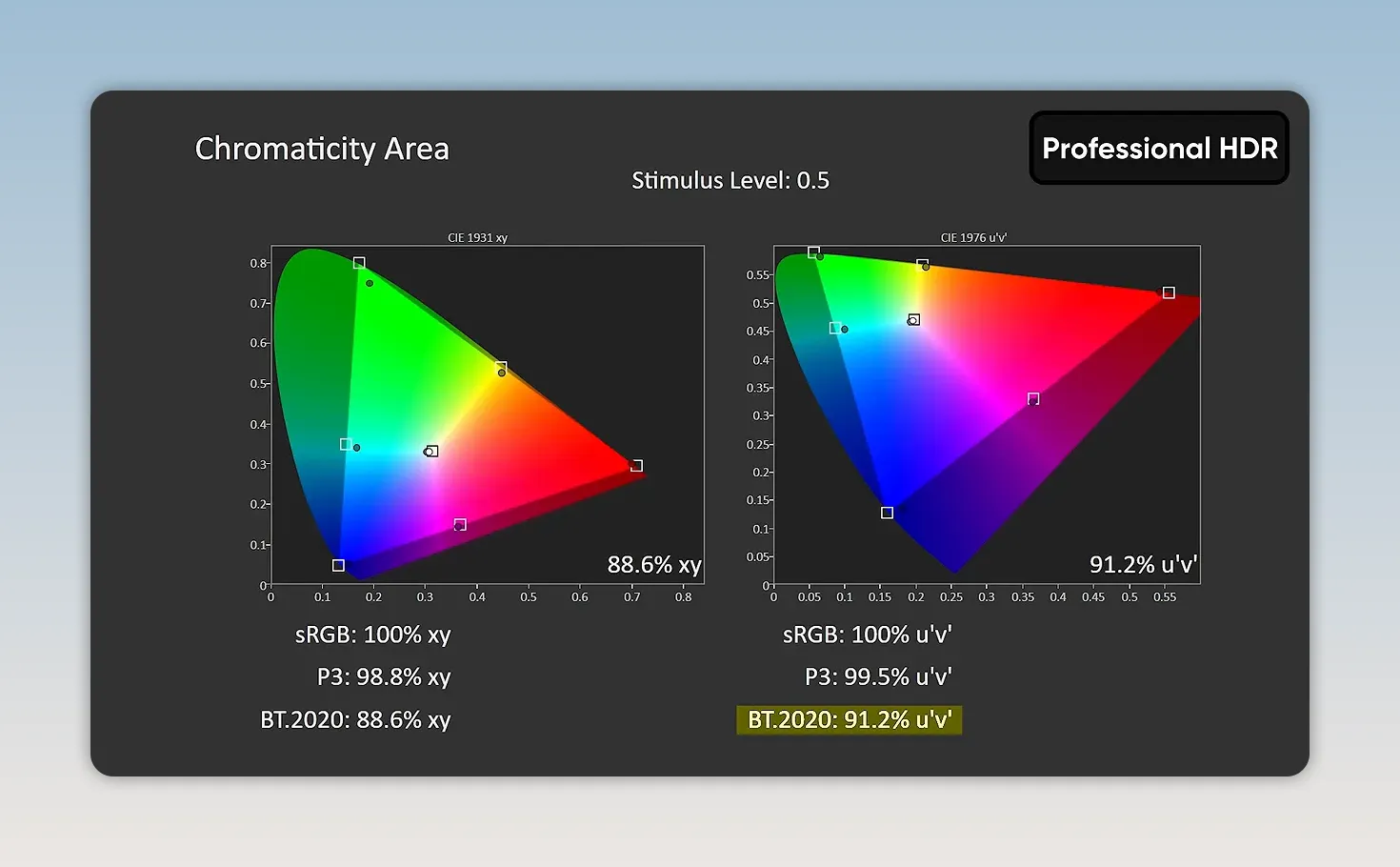
The benefit is enormous coverage of the BT.2020 color gamut, the wide color space used as a reference for these measurements. Our lab measured:
- 92.3% BT.2020 coverage in Vivid mode.
- 91.2% BT.2020 coverage in Professional HDR mode.
That second result is the one that matters most. A television producing a gigantic gamut in a wildly inaccurate showroom mode is one thing. Retaining almost all of it in the mode Sony recommends for a more accurate picture is another.
Brightness is the other half of the story. Sony can drive each color channel hard enough to produce exceptionally bright, saturated colors, rather than just impressive white highlights.
In Professional HDR, we measured almost 4,700 nits of peak brightness. That is peak output, not a claim that the entire 115-inch screen maintains that brightness. The measurement curve falls as the illuminated window gets larger.
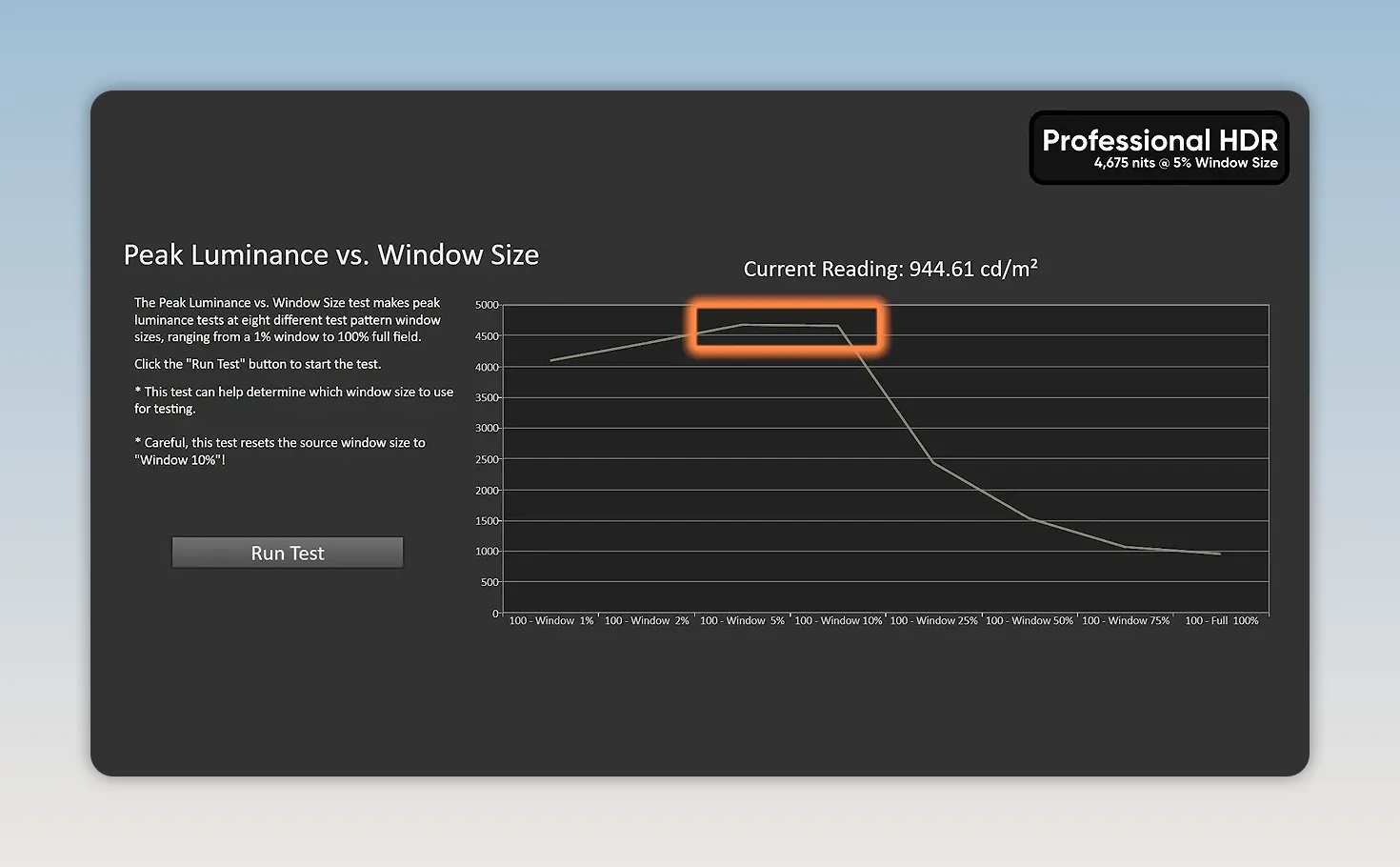
Many HDR films are mastered around 1,000 nits, while some releases target 4,000 nits or beyond. The Sony has enough peak output to make those demanding highlights much more than an exercise in tone mapping.
Setup: Please Just Let Me Use the TV
Before enjoying any of that, we had to survive setup.
There is Google account setup. Then there is the television’s own setup. Then sound optimization, service prompts, AirPlay and HomeKit setup, more waiting, and a screensaver prompt just when you think you have finally finished.
We also hit a roadblock with acoustic optimization because the remote was not connected over Bluetooth. That may have been a consequence of this loaner being configured and reset previously, rather than something every retail buyer will encounter. The sheer number of prompts was irritating regardless.
The picture menus are similarly extensive, though there is a more defensible reason for that. Bravias provide substantial calibration control, including individual RGB adjustments that some competing televisions restrict.
What needs improvement is the explanation. If an option is unavailable because another setting is enabled, tell me what is blocking it and offer a shortcut to change that setting. Do not send me on a treasure hunt through a dozen menus.
Picture settings worth understanding
We disabled motion smoothing before evaluating movies. Beyond that, several controls deserve attention:
- SDR tone mapping: The TV can give standard dynamic range material a brighter, HDR-like presentation if that is what you want.
- Color or white backlight operation: The menus expose a choice between the RGB backlight behavior and a white-backlight option. We discussed its potential usefulness for checking how material might appear on a more conventional display.
- Contrast enhancement: Turning this up can quickly become excessive. Just because a slider goes higher does not mean the picture improves.
- Peak luminance: We checked that this was set high for our HDR demonstrations.
Sony also says its RGB backlighting remains active in challenging scenes, whereas some other RGB-backlit televisions fall back to white-backlight behavior in certain circumstances. Sony’s demonstration supported its claim, although that is not the same as independently verifying every possible scene.
And then there are names like “Reality Creation.” Please, just tell me what the setting does. Reality is already complicated enough.
Movie Performance: Color Without the Collateral Damage
We started with Speed Racer, a film with a 4,000-nit HDR master and absolutely no shortage of color. Whether it is a great movie is a separate debate. As display demonstration material, it is spectacular.
The Sony produced reds and greens unlike anything we had experienced before. Crucially, this was not the exaggerated, everything-is-on-fire appearance of a showroom Vivid preset. The color was intense without making the entire image look indiscriminately boosted.
The more impressive achievement was what did not happen. Bright red car interiors did not noticeably contaminate nearby skin tones. We specifically searched for the kind of colored backlight artifacts we had encountered on a Hisense with difficult material, including 1917.
Sony’s explanation is that it compensates for the colored light coming from the backlight through adjustments to the front LCD layer, effectively on a pixel-by-pixel basis. A green backlight zone does not have to turn every object in front of it green if the LCD accounts for that illumination.
However complicated the implementation is, the result is easy to appreciate: huge color intensity without obvious color spill into neighboring objects.
Vivid mode is still awful
We also tried The Usual Suspects, selecting its extremely bright interrogation-room material to push the display.
Switching to Vivid was hilarious, and not as a compliment. The image became grotesquely exaggerated. Our measurements put its HDR color error at roughly 200 Delta E ITP, which is every bit as terrible as the picture suggested.
Return to Professional HDR, though, and the brightness is still extraordinary. A transition from a dark scene to bright daylight felt like stepping out of a dark room into an overcast day. That sensation requires real luminance capability. It is not something a less capable display can reproduce merely by turning up saturation.
Blooming: Dimming-Zone Count Is Not the Whole Story
Huge LCD TVs can struggle with bright objects against dark backgrounds. Their backlights are divided into zones, and a zone illuminating a small bright object can also brighten the surrounding darkness. That is blooming.
We were concerned because the Sony has fewer zones than some similarly enormous TCL and Hisense models we have tested. A manual count put this 115-inch unit at approximately 3,456 dimming zones.
In difficult scenes from Terminator 2: Judgment Day, the result was far better than that comparison suggested it would be. Material that had produced obvious halos on a competing giant LCD was remarkably controlled here.
Could we find some blooming? Yes. Looking carefully around a character’s shoulder and the adjacent car revealed a little. An OLED would not produce that particular local-dimming artifact.
But we were hunting for it. The Sony’s ability to suppress halos with this zone count was genuinely surprising.
OLED still has the fundamental advantage of per-pixel light control. At 4K, that means roughly 8.3 million independently controlled pixels. Even so, the perceived gap can be smaller than the hardware comparison suggests, partly because bright objects also scatter light inside your eyes.
A useful check is to block the bright object with a finger. Some apparent haloing may disappear because it came from your visual system rather than the screen. That does not excuse actual blooming, but it helps distinguish the two.
Gaming: Here Come the Compromises
The Sony automatically switched into Game mode when we connected a PC. Good. You really do not want to get this wrong.
Outside Game mode, we measured input latency of approximately:
- 166 milliseconds at 60Hz.
- 141 milliseconds at 120Hz.
That is dreadful for interactive use. These are not Game mode latency figures, but they illustrate how important selecting the correct mode is.
The more concerning issue is pixel response time, which is separate from input lag. Even in Game mode, moving elements showed visibly slow transitions and smearing. We had difficulty measuring the response behavior cleanly, so there is no precise response-time result to present as settled fact. The visible motion clarity was not good.
Black frame insertion, or BFI, offered a way to improve clarity. Unfortunately, BFI and variable refresh rate could not operate simultaneously. To enable the motion-clarity treatment, we had to disable VRR.
That is a significant compromise on a flagship television. You are choosing between two useful gaming features rather than getting both.
Games still look spectacular in the right circumstances. Cyberpunk 2077 could light up the room with its bright yellow signage even with the room lights already on. But incredible HDR impact does not erase slow pixel transitions, the BFI limitation, or a 120Hz ceiling that trails some competitors.
Color Accuracy Backs Up the Wow Factor
The Sony’s processing is not just doing impressive party tricks. Our accuracy measurements were strong:
- SDR: Average Delta E 2000 of 1.8.
- HDR: Average Delta E ITP of 7.79.
Those use different error formulas, so do not compare the numbers directly. Within their respective measurements, the results are very good. The SDR performance was strong enough that we would consider color-sensitive work on this display.
There is an important qualification: this was an early unit without the final calibration steps. Sony’s intended calibration also uses CIE 170-2 color-matching functions, while our testing still uses the industry’s more common CIE 1931 basis.
There is a legitimate technical argument for Sony’s approach. For now, we are retaining a consistent testing basis across displays, and we can adapt if the wider industry moves. The practical point is that the color performance was already impressive before the unit received its final tuning.
The Speakers Are Good. Budget for Better Anyway.
The built-in system has eight speakers, including two tweeters and two subwoofers. We gave it the obligatory Crab Rave test without first running room optimization, and it sounded surprisingly good.
Even at a relatively low volume setting, the presentation was respectable. For built-in TV audio, this is absolutely passable.
But you do not spend $31,000 on a television because “passable” is your target.
At this level, put money aside for external audio, including a proper subwoofer. Spending another couple of thousand dollars, at least, makes more sense than pairing an extraordinary picture with merely decent sound. The option to integrate the television as a center channel is convenient, but it would not change my preference for a dedicated speaker.
The Verdict: An Extraordinary Movie TV, Not a Flawless Everything TV
Would I replace my enormous TCL with this Sony? Immediately. No hesitation.
The combination of accurate, intensely saturated color, startling HDR brightness, and excellent blooming control makes the Bravia 9 II a genuinely better television for the movie experience we tested. Its performance is not reducible to a spec-sheet victory. The backlight and LCD processing work together exceptionally well.
That does not make it a professional mastering monitor, nor does it make it the best choice for every use. The missing anti-glare coating is disappointing, setup needs fewer interruptions, and gaming exposes meaningful motion limitations.
For a no-expense-spared giant-screen movie setup, though, Sony has built something extraordinary. The $31,000 price is absurd. So is the picture. At least those two things are in agreement.
Sponsor: Learn to Code With Boot.dev
Boot.dev teaches coding through real projects with a game-like structure, including quests, experience points, levels, and boss fights. Help is available through its Discord community and Boots, its AI-powered bear wizard. Use code LTT for 25% off your first month or year.


