The Nvidia CMP 170HX used to offend me on principle. Here was a mining card derived from seriously capable A100 hardware, stripped of graphics functionality and restricted so heavily that, once mining stopped paying, its next logical destination was the e-waste pile.
Not because compute hardware stops being useful when cryptocurrency prices fall. A100s are still valuable for AI. Nvidia had simply locked down the things that would have made this particular card useful elsewhere: floating-point performance, PCI Express bandwidth, and almost all of its memory.
Now modders have found ways around those restrictions. Our cards went from exposing just 8GB of memory to 64GB of HBM2E, with dramatically better compute performance. There is even a hardware modification to restore the missing PCIe lanes.
Actual downloadable RAM. Finally, the internet’s oldest terrible advice has a legitimate use case.
But before you buy a stack of these things for local AI, there is a catch. We tested two cards, and one had faulty memory.
Key Takeaways
- The software unlock exposed 64GB of memory and dramatically improved compute performance on our CMP 170HX cards.
- The unlock depends on the host’s modified drivers rather than permanently changing the card.
- Newly accessible memory can be defective, making dedicated validation essential before relying on the hardware.
- A separate capacitor modification restores x16 PCIe connectivity, while cooling and installation still require planning.
Table of Contents
- Why the Stock CMP 170HX Is So Limited
- Establishing a Baseline: What Can 8GB Actually Do?
- How the CMP 170HX Software Unlock Works
- After Unlocking: From Painfully Limited to Genuinely Usable
- CMP 170HX vs. Two RTX 3090 Ti Cards
- The Real Benefit of 64GB Is Flexibility
- The Biggest Risk: Your Hidden Memory Might Be Broken
- The Capacitor Mod Restores the Missing PCIe Lanes
- Cooling These Cards Takes Planning
- Should You Buy an Unlocked CMP 170HX?
- Sponsor: Vessi
Why the Stock CMP 170HX Is So Limited
The frustrating thing about the CMP 170HX is how much potential sits underneath its restrictions. Its A100 ancestry gives it a far more interesting foundation than its mining-only configuration suggests.
In stock form, though, three limitations get in the way:
- Only 8GB of accessible VRAM: That severely limits model size and the memory available for context.
- Restricted floating-point performance: Having enough memory to load a small model does not mean the card runs it quickly.
- A heavily constrained PCIe connection: Moving model data from the system to the card takes much longer than it should.
These are compute cards, not secret gaming GPUs. Unlocking them does not add display outputs or turn them into GeForce cards. We used a GTX 1650 for video output, while the CMPs did the AI work.
Our comparison hardware was a pair of RTX 3090 Ti cards. Each has 24GB of memory and stronger compute performance for these workloads, making them a useful contrast to a slower card with a much larger memory pool.
Establishing a Baseline: What Can 8GB Actually Do?
We used llama.cpp and its benchmarking tools to compare the same hardware before and after unlocking. This was not a comprehensive benchmark suite. The point was to establish whether the modification made a meaningful difference without changing the underlying card.
First up was Granite 4.1 8B, a small model that fit into the stock configuration. Even there, memory was tight enough that we used a 16K context rather than the 64K context Lucas would normally choose.
The card could answer questions. Whether its answer to “Who’s the best tech YouTuber?” deserved to exist was another matter. Smosh? Lots of love to Ian and Anthony, but that is a creative interpretation of “tech.”
Moving the same small model to a 3090 Ti made the difference obvious: it loaded faster and generated its response much faster. Since both cards could fit the model, the CMP’s memory capacity was not the only thing holding it back.
Then we tried a larger Qwen model, with a model file around 28GB to 29GB. Our stock CMP configuration failed to load it, despite having enough system memory available to make a fallback conceivable. One 24GB 3090 Ti could not accommodate that configuration either. Two could, by splitting the model across their combined 48GB.
We also encountered instability on the GeForce setup. Our setup note pointed to the PCIe risers as the suspected cause, which is important context: a flaky test bench is not evidence that an entire GPU family is unreliable.
How the CMP 170HX Software Unlock Works
The software project we used, cmpunlocker, changes the system’s driver environment rather than permanently converting the card.
The unlock belongs to the configured computer, not to the GPU. Put a compatible card into that machine and it can benefit from the modified drivers. Move the same card to an unmodified machine and its restrictions return.
That distinction matters. This is not a one-time firmware flash that produces an unrestricted accelerator you can move between computers without further setup.
The Linux preparation
Lucas rated the difficulty at roughly six out of ten. So, “pretty easy,” provided your definition of easy includes removing GPU drivers and rebuilding Linux boot files.
The preparation we discussed involved:
- Cloning the unlock project’s repository.
- Disabling Secure Boot.
- Removing the existing Nvidia drivers.
- Blacklisting Nouveau so it would not interfere.
- Rebuilding the initramfs to apply the relevant changes.
- Installing the specific Nvidia driver version supported by the unlock.
- Applying the project’s driver modifications.
This is an overview, not a substitute for the project’s installation instructions. Driver compatibility is part of the procedure, not an optional detail. We kept our mixed Nvidia setup on a single driver rather than trying to establish whether separate driver versions could coexist.
The LTT Labs CMP 170HX companion article provides the fuller technical reference and links to the relevant project material.
What changes after unlocking?
On our cards, the software unlock exposed 64GB of memory and restored substantially more floating-point capability. The broader modification is described as supporting up to 80GB on applicable hardware, but 64GB was the capacity demonstrated in our setup. Do not treat the highest reported capacity as a guarantee for an arbitrary secondhand card.
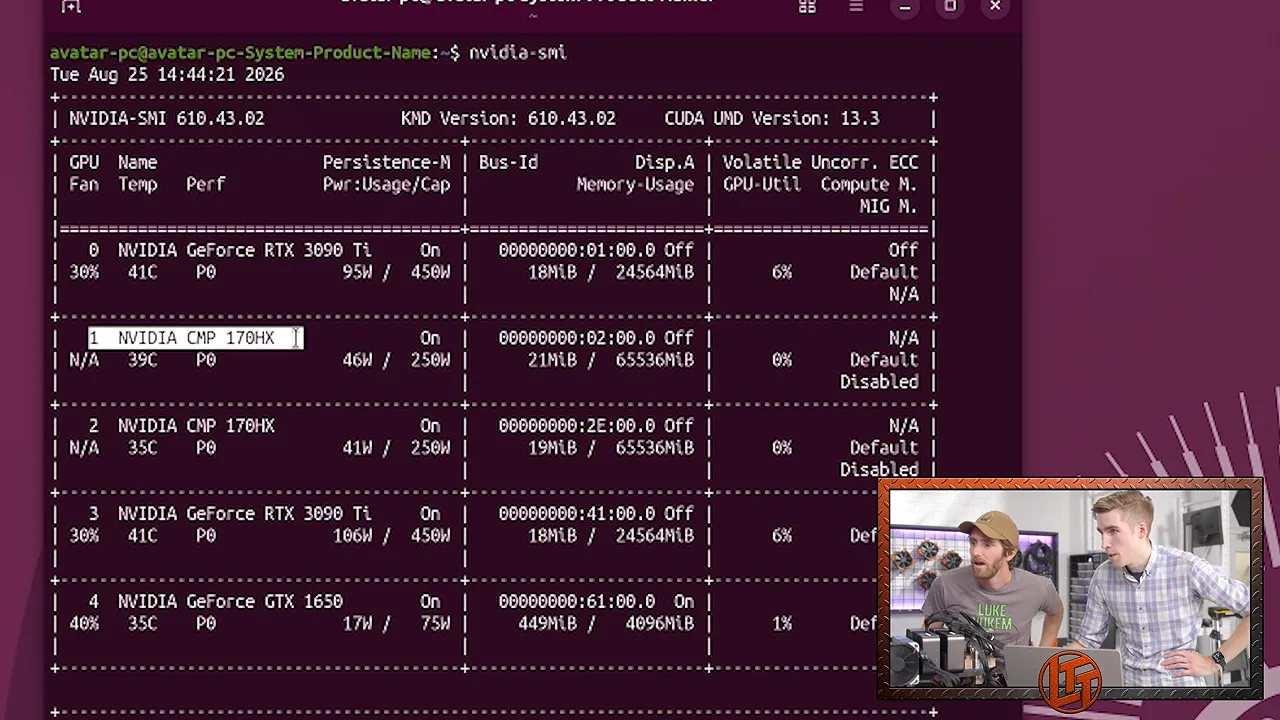
The power limit did not actually increase. Instead, the card became capable of doing enough work to approach its existing roughly 250W limit. Before the unlock, the compute restrictions had prevented our workloads from getting anywhere near that level.
One major restriction remained: the software-unlocked card still had only a four-lane PCIe connection. The software path was described as enabling Gen 2 operation, but it did not restore the missing lanes. That required soldering.
After Unlocking: From Painfully Limited to Genuinely Usable
Running the small model again was a completely different experience. Response generation was dramatically faster, much closer to the kind of interaction we had seen on the 3090 Ti.
It did not become a better model, of course. Faster nonsense is still nonsense. But the hardware was finally doing useful work at a useful speed.
A longer prompt helped expose prompt-processing performance, which a short question barely exercises. The unlocked CMP still trailed the GeForce card, but its performance was in an entirely different category from the stock configuration.
Loading a model and running a model are different problems
The larger Qwen model now fit on a single CMP. It took a while to load because that model data still had to squeeze through the limited PCIe connection.
This is the important distinction: fast onboard memory does not fix a slow connection to the host computer. HBM2E can be extremely fast once the data is on the card. It cannot make the initial transfer through PCIe magically disappear.
Once loaded, though, Qwen ran at a genuinely usable speed. One of the displayed interactions generated roughly 33 tokens per second. A longer test using about 1,000 words of placeholder text added a noticeable prompt-processing delay, but the resulting experience remained practical.
That is the transformation here. The stock card struggled within an 8GB budget. The unlocked card could hold a much larger model and respond quickly enough for interactive use.
CMP 170HX vs. Two RTX 3090 Ti Cards
Our larger Qwen configuration did not fit on one 3090 Ti, so we used two in layer-split mode. That let the application distribute the model across their combined 48GB of VRAM.
This is application-managed distribution, not a magical conversion into one ordinary 48GB GPU. We had an NVLink bridge available, but it was not required, and our earlier checks had not shown a substantial benefit from it for this setup.
With a short prompt, the dual 3090 Ti configuration did not produce the enormous advantage you might expect. Generation was around 30 tokens per second in the quick comparison, broadly similar to the single unlocked CMP’s result.
A much longer prompt made the GeForce cards’ compute advantage more apparent. The dual-card setup processed roughly 2,000 prompt tokens per second in that demonstration.
The useful distinction is between three separate parts of the experience:
- Model loading: Getting the weights into GPU memory.
- Prompt processing: Working through the input before generating a response.
- Token generation: Producing the response itself.
A configuration can be much better at one without being proportionally better at all three.
We also ran two unlocked CMP cards. That worked, but multi-GPU performance introduces more variables, especially with limited PCIe bandwidth. Layer splitting, tensor parallelism, and the amount of communication between cards can all change the result.
These were quick, illustrative comparisons, not certified Labs performance results. Anyone deploying this hardware seriously should expect to tune the configuration and test the actual workload rather than shop based on one token-rate number.
The Real Benefit of 64GB Is Flexibility
The obvious use for more VRAM is a larger model. It is not the only useful one.
A model occupying 20GB to 40GB can leave substantial room on a 64GB card for context, depending on the model and configuration. That extra capacity can also support:
- Longer conversations or larger coding inputs.
- Multiple concurrent requests, each with its own context.
- A main assistant alongside an embedding model.
- Additional models for tasks such as image generation.
- Background agentic workflows where capacity matters more than peak response speed.
Very large context windows, including the quarter-million or half-million-token possibilities discussed during testing, depend on the model and memory requirements. A 64GB label does not guarantee either figure.
The appeal is that you have choices. You can spend the memory on a larger model, more context, more concurrent work, or additional models. For local coding assistance and background agents, that can be more useful than maximizing compute performance alone.
The Biggest Risk: Your Hidden Memory Might Be Broken
Here is where the bargain gets significantly less comfortable.
Both of our CMP cards could participate in an AI demonstration. One still failed a memory test.
The test writes data into GPU memory, reads it back, and checks for discrepancies. Our faulty card produced an error within the short test period. Lucas had seen failures appear within the first few minutes in earlier testing, although a proper validation run should continue longer.
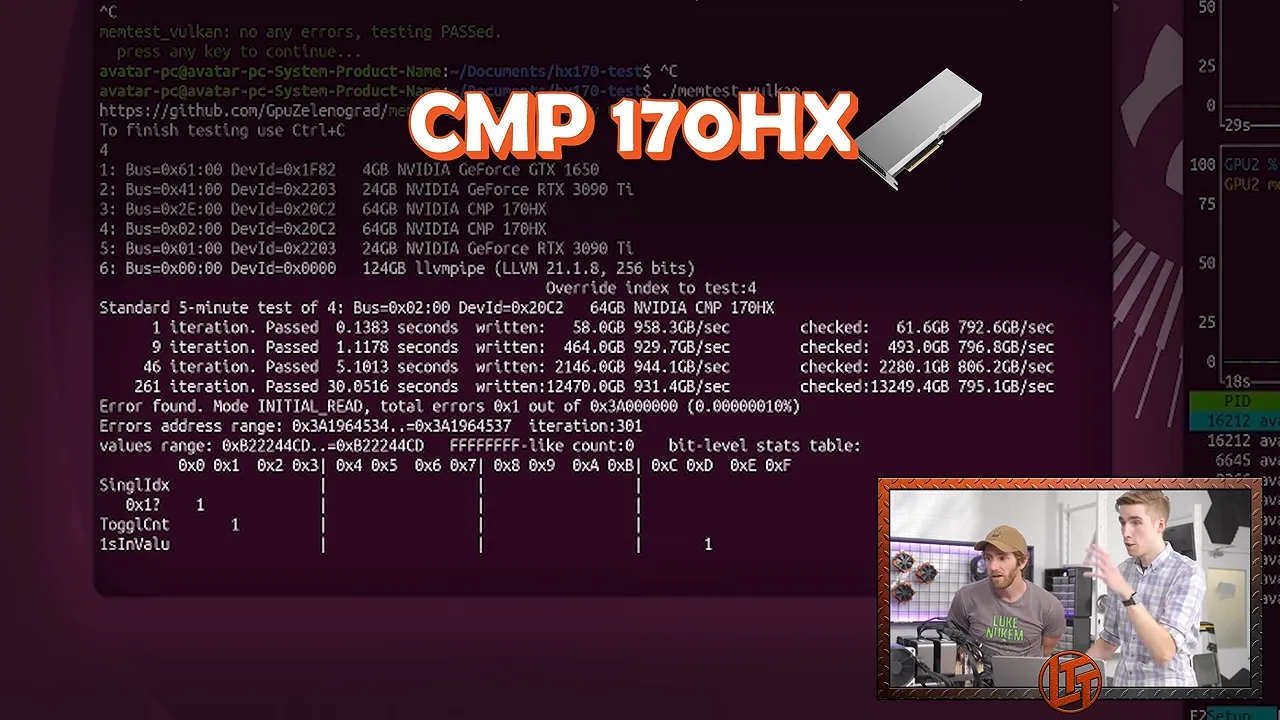
Why would the hidden memory be faulty? Because there can be legitimate reasons for hardware to end up in a lower-tier product.
A chip might miss a power target or another quality threshold. It might also have defective HBM. That memory sits on the GPU package, so a manufacturing defect is not something you fix by swapping a conventional memory module.
Restricting accessible memory can make a partially defective package useful for a narrower workload. Unlocking the rest does not repair it.
We cannot identify the original manufacturing history of every CMP 170HX. What we can say is that our sample included a card whose newly accessible memory was not reliable.
Bad memory can cause crashes or inconsistent results. There were anecdotal reports of temperature affecting stability, including a borrowed card supposedly behaving better when very hot. That is not a production reliability strategy. “Maybe it works above 85 degrees” is not the reassurance you want from your compute hardware.
There is also a secondhand-market risk: buyers could purchase cards in bulk, test them, keep the good ones, and resell the failures. We did not establish that any particular seller was doing this, but it is a possibility worth considering before paying an unlock premium.
The Capacitor Mod Restores the Missing PCIe Lanes
If you have a card with healthy memory, there is another performance restriction to tackle.
Using schematics referenced by the 170th Street community, Dan installed 24 tiny capacitors above the PCIe edge connector. This restored x16 lane functionality.
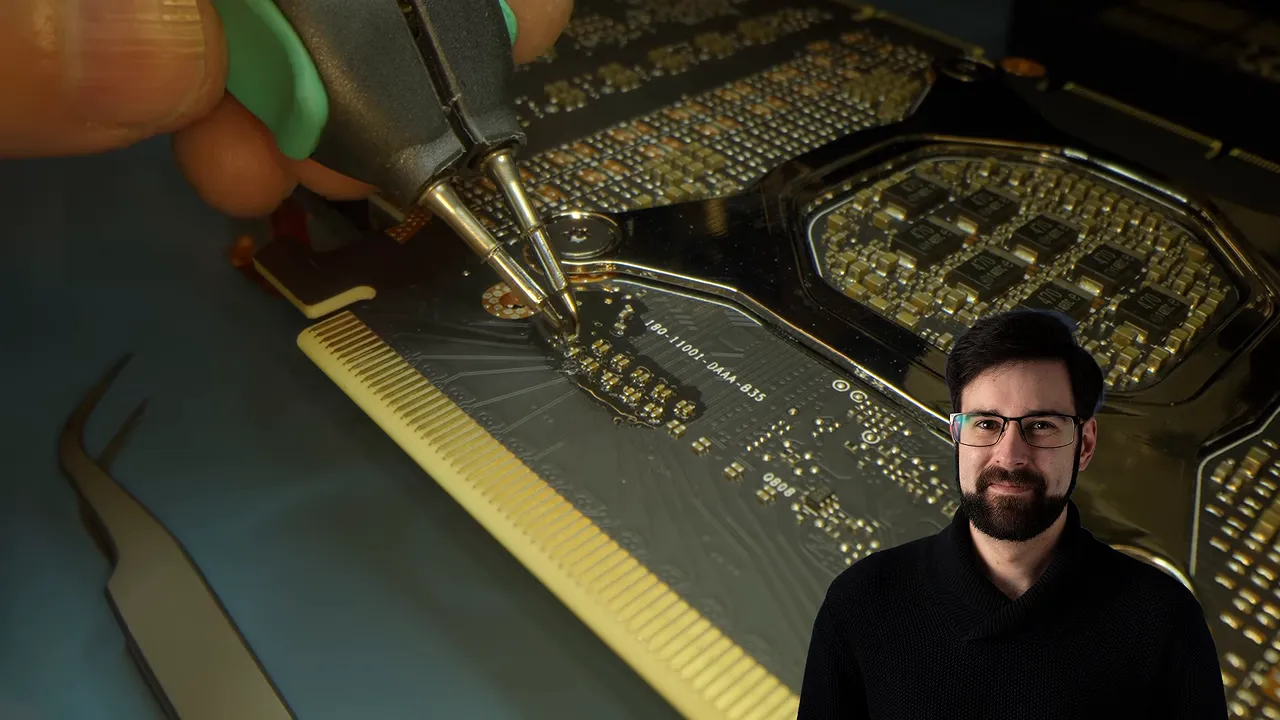
This is a physical board modification, separate from the driver unlock. Restoring x16 connectivity also does not mean the card suddenly has a modern, unrestricted PCIe link. Lane width and PCIe generation are different specifications.
Rather than attempting to untangle every possible multi-GPU parallelism benefit, we checked something straightforward: model loading.
With two hardware-modded CMP cards installed, the Qwen model loaded noticeably faster than in the earlier single-card demonstration. That is an immediately useful improvement if you frequently load or switch models, though it was not a controlled measurement isolating every variable.
Cooling These Cards Takes Planning
Cooling is another part of the project that does not disappear just because the driver unlock succeeds.
We reused a fan-and-duct arrangement that pushes air through the card’s heatsink. It worked reasonably well and stayed reasonably quiet. The 120mm CMP 170HX fan duct model is available if you want to reproduce that approach.
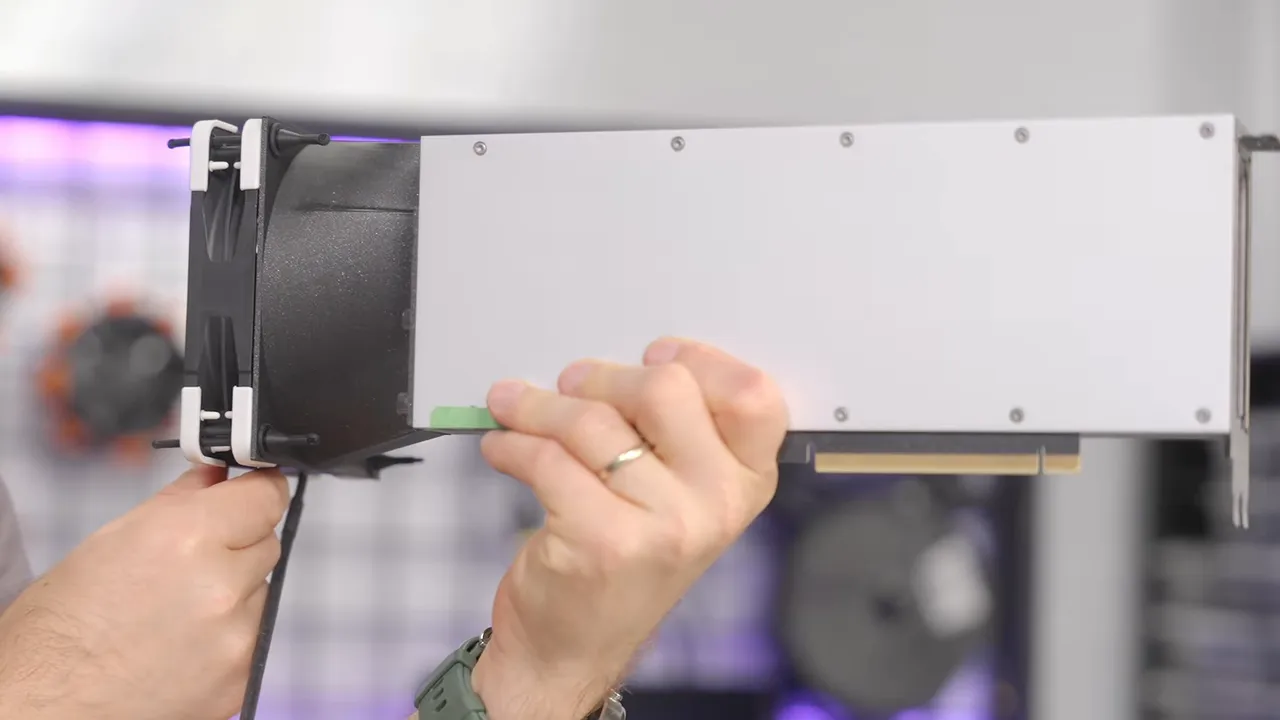
The downside is size. These assemblies take up enough room that we needed risers, adding another potential source of trouble whenever the system behaved unpredictably.
The 170th Street community also has information on water cooling. Either way, plan the physical installation alongside the software setup. A working unlock is not much use if the finished system cannot cool the cards or maintain a reliable PCIe connection.
Should You Buy an Unlocked CMP 170HX?
When we first investigated the cards, the prices we discussed were roughly $1,100 to $1,300 each. By the time of testing, that had risen to about $1,600 to $1,900. Those are observations from this project, not a promise about what a listing costs now.
At the higher prices, a good card can still be compelling. A single accelerator with 64GB of usable VRAM, practical interactive generation speed, and enough capacity for background agentic work fills a real niche.
But the purchasing decision has to include more than memory capacity:
- Memory health: Newly exposed VRAM must be tested, not assumed good.
- Software maintenance: The unlock depends on a compatible Linux driver environment.
- PCIe limitations: The software-only configuration still has a narrow connection.
- Cooling and installation: Fans, ducts, space, and risers can complicate the build.
- Modification effort: Restoring x16 functionality requires delicate soldering.
If you want a straightforward graphics card that also runs AI models, this is not it. If you are comfortable with Linux, hardware validation, and a little black-magic driver tomfoolery, it is a fascinating way to recover useful compute from hardware that was otherwise painfully restricted.
The achievement is real: an 8GB mining card can become a useful 64GB local AI accelerator. Just make sure the secret memory works before celebrating how much of it you have.
Sponsor: Vessi
Vessi’s Weekend Chelsea is promoted as lightweight, breathable, comfortable, and waterproof. The sponsor offer includes 15% off a first order, a one-year warranty, and free shipping on North American orders over $110.


