Microsoft’s dominance of the desktop is not a divine right. It is something the company has to keep earning. And when people start tolerating your product instead of enjoying it, that dominance becomes a little less permanent than it looks.
Microsoft’s Project K2, an effort to overhaul the Windows experience and win users back, suggests the company recognizes that problem. But it also raises an interesting question: What would our lives look like if Windows disappeared tomorrow?
After spending more than a month with almost no Windows in my life, I could imagine my own answer pretty easily. To get beyond my particular collection of computer problems, I asked five people with different backgrounds how much they rely on Windows, what keeps them there, and what leaving would actually cost them.
The surprising part was not that they had complaints. Everyone has complaints about their computer. It was how much of their lives had already moved elsewhere.
Key Takeaways
- Familiarity and working software keep these users on Windows more than enthusiasm for the operating system itself.
- Linux and macOS already handle substantial parts of their everyday and professional workflows.
- Software compatibility and accumulated troubleshooting knowledge remain meaningful barriers to switching operating systems.
- Windows disappearing would reduce choice, but Windows becoming less essential could give users more freedom.
Life Outside Windows Has Already Started
Windows still has a strong position among everyday computer users. Yet everyone I spoke with had either invested in another platform or, in one case, largely stopped using conventional computers altogether.
- Ludwig uses Windows for his streaming PC, but handles planning, Google Docs, Sheets, and Calendar on a MacBook Air.
- Niko from Corridor Digital keeps a Windows 10 Puget Systems workstation for visual effects and filmmaking, while relying heavily on a MacBook Air for everyday use.
- James from Hacksmith Industries still uses Windows for general business tasks, but has increasingly adopted Linux distributions at work. Hardware implementation and embedded software are already Linux territory for him.
- Dan, a developer, prefers doing things on a Mac whenever he can. He reaches for his Windows machine primarily for PC gaming and workloads where he wants its hardware horsepower, such as Blender rendering.
- Peter, a concrete truck driver, remembers using Windows 95 and XP, but no longer uses Windows or conventional computers in his daily life.
Niko’s split was especially revealing. His workstation is a specialized production tool, and keeping visual effects and filmmaking software working makes changes feel expensive. His laptop, meanwhile, wins him over with battery life, speed, and the absence of constant attempts to capture his attention.
That is not quite the same thing as declaring one operating system superior at everything. It is choosing different tools for different jobs. For Microsoft, however, the result is the same: Windows is no longer the automatic destination for every task.
There is an important limitation here. A small group drawn mostly from online creators is going to skew more technically adventurous than the general population. This is not a representative market survey. But these were not people who had always avoided Windows. Every one of them had started on it or used it extensively.
These are people Microsoft already had.
Familiarity Is Powerful. It Is Not the Same as Loyalty.
When I asked how important Windows was to their lives, the answers tended to come back to the same things: habit, convenience, and familiarity.
James has used Windows through generations stretching from Windows 95 to Windows 11. Peter said that if he were to return to a computer, familiarity would be his reason for choosing it. For Dan, Windows is an easy, known interface for getting to games.
Niko offered a useful comparison: the rubber in your tires matters enormously to your life, but that does not mean you want an emotional relationship with it. It is a functional component that lets you do something else.
That is how many people think about an operating system. Windows matters because the applications and workflows running on top of it matter. Microsoft may want Windows to be a destination, a relationship, or an ecosystem of services. The person sitting at the desk may simply want to finish a project.
Ludwig initially sounded like the strongest counterexample. Windows was essential to his ability to stream, he explained. But digging into that answer revealed a more practical dependency: he knows his setup works, and he does not want to spend his time rebuilding it on Linux.
He wants to turn on the computer and start streaming. Fair enough. An alternative that requires a substantial setup project is not equally convenient just because it is technically capable.
Still, there is a big difference between staying because a product delights you and staying because switching sounds annoying.
Operating System Flexibility Is Becoming Normal
Several of these conversations were not merely accepting of alternatives. They were enthusiastic about becoming less attached to a particular platform.
Niko compared changing operating systems to an artist changing pencils. You might have developed techniques around a familiar tool, and another one might initially feel awkward. But the underlying skill does not disappear.
Learning another operating system can also make you better at understanding computers. You have to distinguish between what your computer does, what Windows does, and what a particular application does. Those are not always the same thing.
Documentation, online communities, search engines, and AI assistants can help answer questions about unfamiliar file systems, software alternatives, and open-source tools. Niko and James were also optimistic about AI-assisted coding, often called vibe coding, making it easier to build small tools around their own needs.
James, despite being a mechanical engineer rather than a software developer by trade, already uses that approach to solve problems in his business, design process, and content workflow. His attitude is consistent with the Hacksmith approach generally: use whatever tool gets the job done.
Then there was Ludwig’s realization that he was already using Linux.
He owns a Steam Deck. Its SteamOS operating system is Linux-based, using the Linux kernel and an Arch Linux foundation with Valve’s customizations. Once that connection clicked, his estimated Linux usage went from essentially nothing to at least six percent.
That little exchange gets to something important. When the experience works, people do not necessarily care which operating system is underneath it. They may not even know.
Why Windows Users Start Looking Elsewhere
Licensing adds cost and friction
For James, money is part of the equation. A business with lots of computers needs to handle Windows licensing properly, and buying licenses repeatedly adds both expense and administrative work.
Putting Ubuntu on a suitable machine can remove that particular problem. No shopping around for an appropriate Windows license. No extra licensing transaction before the computer can serve its purpose.
That does not mean every Windows update costs money, or that switching platforms has no costs of its own. The complaint is about the cumulative friction of licensing machines when a free alternative can already do the required job.
The operating system keeps asking for attention
The stronger objection was user experience.
Niko’s frustration is that Windows seems pulled in multiple directions at once. It is a desktop operating system, but it is also a place to promote OneDrive, Microsoft’s store, and whatever other service currently needs more engagement.
From the user’s perspective, those corporate priorities can become interruptions between them and the task they actually bought the computer to do.
His analogy was a car that makes you sit through an advertisement before it starts. That was a comparison, not a description of an actual Windows startup requirement. But the feeling behind it was clear: paying for a tool should not mean surrendering your attention to its manufacturer.
He has already started moving more work to Linux and macOS. His Windows workstation remains on Windows 10 partly because he does not want the additional baggage he associates with Windows 11.
Professional work can pull people toward other platforms
Dan’s route away from Windows was less about one irritating feature and more about the work itself.
He grew up building PCs and participating in the usual platform fanboy arguments. Professional web development changed his priorities. The software he was writing typically ran on Linux, so having a Linux-like working environment became valuable. That helped draw him toward the Mac.
Containerization has since made it easier to run code consistently across systems, but the larger point remains: people choose platforms around their work. Windows does not automatically remain the best fit just because it was their first fit.
Time is a cost, too
Peter put the frustration more simply. Time spent waiting for software to install, an update to stall, or a machine to restart is time not spent doing something useful.
Technical enthusiasts can get used to treating that maintenance as part of owning a computer. Plenty of other people would prefer not to have a second job as their device’s unpaid administrator.
What Would People Actually Miss?
Some of the answers were a little brutal.
James started with the Windows key, then immediately qualified his appreciation by criticizing Start menu search and its web results. Niko picked Task Manager for its quick, straightforward usefulness.
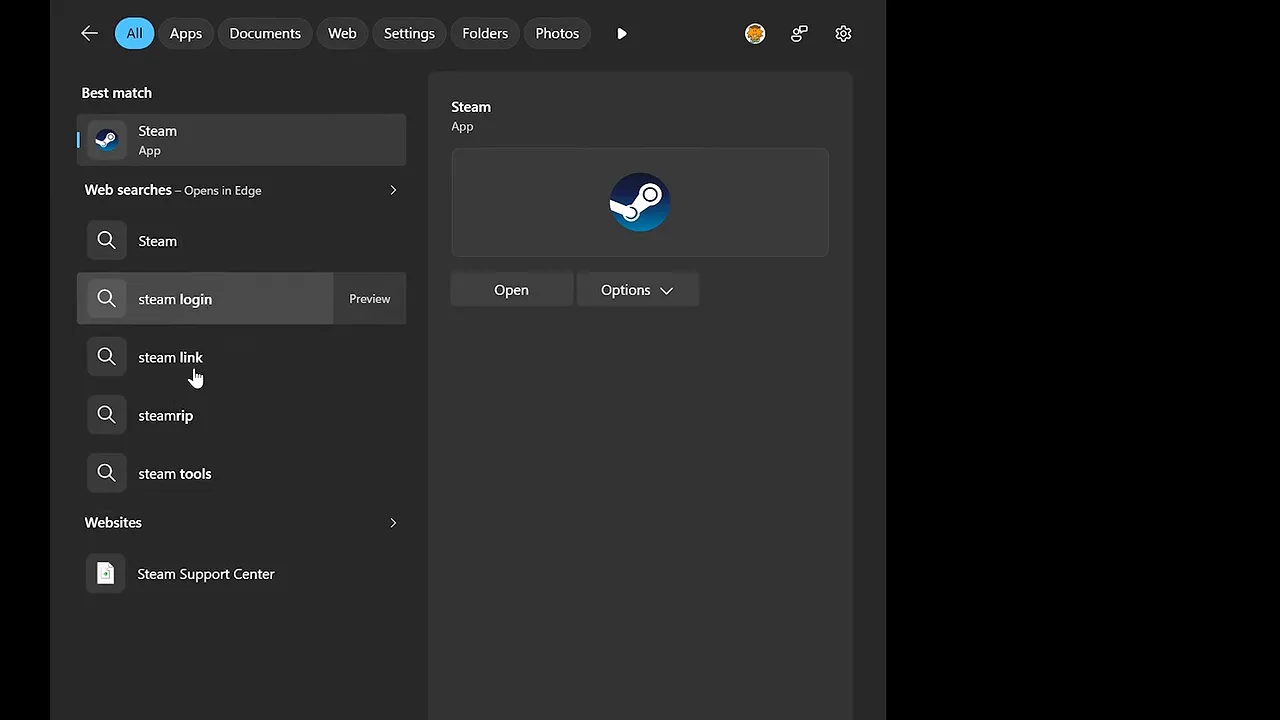
Ludwig reached first for classic Windows pinball and the old screensavers. Nostalgia is doing some heavy lifting there.
But then he landed on something much more substantial: League of Legends and its lack of Linux support. A favorite game can be a perfectly valid reason to keep an operating system, even if the operating system itself is not doing much to inspire affection.
His biggest current frustration was also gaming-related. Alt-tabbing out of certain full-screen games sometimes makes all his monitors go black and briefly freezes his stream. He was not sure whether Windows itself was responsible, and that uncertainty matters. Games, graphics drivers, and display behavior all complicate assigning blame.
The experience is still bad. For someone whose job involves moving between a game and streaming tools, a brief interruption becomes a recurring workflow problem.
That is the kind of unglamorous issue power users would probably appreciate having fixed more than another attention-grabbing feature.
Switching Might Take Weeks. Replacing a Workflow Is Harder.
How long would it take to get comfortable somewhere else?
The estimates were shorter than I expected:
- Ludwig expected several difficult weeks, with help from Linux-using friends for the initial setup.
- James thought he could probably manage the transition within a month or two, although it would hurt.
- Niko reckoned about two weeks to get past the initial awkwardness.
- Dan felt games were the main obstacle, specifically his desire to play Star Wars Zero Company.
Those are personal estimates, not migration benchmarks. Getting comfortable with a desktop is also not the same thing as reproducing every capability of an established workstation.
Ludwig’s concerns were wonderfully specific. He already knows how to find and configure the software he uses for GameCube emulation and controller optimization on Windows. Changing platforms would mean relearning those little troubleshooting routines and checking which tools are available.
That accumulated knowledge is valuable. A workflow is not just a list of applications. It is knowing where to get them, which settings work, and what to try when something breaks.
My own Linux challenge produced a similar experience: the adjustment period was real, but it was not endless. I ended up using Linux for months longer than required, and more than one participant stuck with it for the long haul.
Software compatibility remains Microsoft’s strongest defense
Niko has already tried going entirely Linux and encountered the limits. Some tools he needs remain Windows-based. Working with other people who do not use Linux also means maintaining a Windows connection.
James raised remote access as another example. He loves the convenience of Chrome Remote Desktop and worried about recreating that same experience across a Linux-based setup. His understanding of its Linux availability was uncertain, but the underlying concern was practical: replacing a familiar remote-access workflow may require checking support, changing configuration, or choosing another tool.
There may be alternatives to most things. Finding one is not the same as confirming that it works with your machines, your collaborators, and your habits.
Windows’ software compatibility advantage is still real. The question is how long Microsoft can rely on it while giving people reasons to investigate the exits.
A World Without Windows Would Still Be Worse
Being able to leave Windows personally does not mean wanting it to vanish globally.
Ludwig rejected the idea that losing Windows and its source code would improve the world. Destroying information and removing options is not a win, even if it forces some people to discover something they prefer.
Dan remembered being in an airport during the widespread CrowdStrike-related Windows outage. That was miserable enough. An actual disappearance of Windows would be an entirely different scale of disruption.
Niko made the broader competition argument: more operating systems mean more ideas, more software, and more choices. Windows works well for plenty of people. That is a reason to improve it, not eliminate it.
There are really two separate thought experiments here:
- Could an individual adapt to life without Windows? Several of the people I spoke with thought they could, and some had already done much of the work.
- Would the world benefit if Windows disappeared tomorrow? The answer was firmly no.
Less dependence on one platform could be healthy. Suddenly losing that platform would not be.
The Bigger Threat Might Be Apathy
People still want Windows in the picture. They are tired of its direction, or they have stopped feeling strongly about it at all.
Niko’s expectation is straightforward: get him to the thing he needs as quickly as possible, then stay out of the way.
Dan remembered how significant Windows XP’s user accounts felt when his dad installed it on the family computer. Having his own space on a shared PC was a meaningful change in how he used the machine.
He has not experienced many operating system changes that felt equally important since. There have been fixes, refinements, and useful ecosystem features. But most of his actual time is spent in a browser, terminal, game, or application.
For ordinary computing, James made much the same point. Email, online shopping, web browsing, and streaming entertainment do not inherently require Windows. The major desktop alternatives can handle those needs.
That creates a difficult problem for Microsoft. If people increasingly regard the operating system as interchangeable plumbing, adding more visible features may not make it more valuable. It may simply make the plumbing noisier.
Maybe Windows Does Not Need to Disappear. Maybe the Boundaries Do.
James proposed a more appealing future than one operating system defeating the others: a computer that could use all three major desktop platforms so seamlessly that the person using it barely notices.
He described it as something like triple booting, but without the usual interruption and deliberate switching. The computer would simply use the best environment for each task.
That is a speculative ideal, not a promise that today’s triple-boot setups work that way. Virtualization and translation layers offer a more useful way to think about the direction: separating the application you need from the operating system you happen to prefer.
In that future, Windows could remain important without having to own the entire experience. Linux could handle one workload, macOS another, and Windows a third.
The user gets the useful part. The platform argument becomes somebody else’s problem.
Can Microsoft Win People Back, and Does It Want To?
There is still an opportunity here. The people using Windows had not all abandoned it, and their complaints showed they still cared enough to want something better.
But Microsoft should not assume that window stays open forever. Familiarity keeps people around until an alternative becomes familiar, too.
There is also the question of incentives. Niko wondered whether Microsoft needs Windows itself to be great in order for Microsoft to keep making money. That was a concern about the company’s priorities, not a financial analysis. But it captures the fear behind many of these complaints: what is profitable for the platform owner may not align with what is useful for the person at the keyboard.
Maybe the era of exciting operating system upgrades is mostly over. Maybe most people no longer need their desktop to reinvent itself.
That does not mean Windows cannot get better. It might mean the most meaningful improvements are the least theatrical ones: less friction, fewer interruptions, reliable everyday behavior, and a clearer respect for the user’s time.
I am still rooting for Microsoft to make that happen. Not because the world needs fewer alternatives, but because it deserves a Windows that earns its place among them.
Sponsor: RISION Magic Thermal Cameras
RISION’s Magic Pro turns a compatible phone into a thermal camera through its bottom port, helping identify potential heat loss, leaks, and electrical hot spots. Its QuadIR super-resolution technology and real-time alignment of visible and thermal imagery are designed to make details easier to identify, while the app supports analysis and report generation for sharing findings with a colleague or HVAC specialist.
The more budget-friendly Magic offers 320 × 240 resolution. The promotion accompanying this piece included an extra five percent off with code LINUSTECH; check current pricing and offer availability.


