A 55-inch 4K TV for $200 sounds like the kind of deal that should come with an asterisk the size of the screen. Built-in streaming apps, HDR10 support, and enough HDMI ports for an actual entertainment setup? Okay, where’s the catch?
That was our question about Insignia’s F50 Series 4K Fire TV. At the time we checked, Amazon showed more than 10,000 purchases in the previous month. And the price wasn’t even really $200. We paid $179.99.
After putting it through our lab tests and using it for streaming, dialogue, and gaming, I understand the appeal. This is not a secretly high-end television. It is, however, a surprisingly useful amount of television for very little money. You just need to know which specifications deserve your attention and which ones deserve a raised eyebrow.
Quick Summary
- At our $179.99 purchase price, the 55-inch Insignia delivers compelling basic 4K value.
- Low brightness, reflections, and narrow viewing angles limit picture quality despite surprisingly good color accuracy.
- Fire TV handles ordinary streaming, but sluggish controls and weak Wi-Fi complicate more demanding use.
- Game mode reduces input lag dramatically, but slow pixel transitions undermine motion clarity.
What Does $180 Actually Get You?
The basic proposition is straightforward: a 55-inch display with 4K resolution, Amazon’s Fire TV operating system, and support for HDR10 content. Insignia is Best Buy’s established private-label brand, so this isn’t some mystery company whose name looks like somebody lost a fight with a keyboard.
It was also selling fast enough that, by the time we ordered ours, the cheaper 50-inch version had overtaken it on Amazon’s bestseller list. We expected that smaller sibling to perform similarly, but our measurements here apply to the 55-inch unit we tested.
The packaging includes the essentials:
- Two plastic feet and a power cable.
- A remote control.
- Handling instructions and a surprisingly comprehensive quick-start guide.
- Child-safety guidance on positioning the television safely.
The protective bag even has handles, which makes getting the TV out of the box less awkward. Its low weight certainly helps, too.
Build quality is about what the price suggests. There’s plenty of plastic, and the chassis has some flex. But nothing about it struck me as a major problem for a television that cost less than $180 before tax. It feels inexpensive because, well, it is inexpensive. That’s allowed.
A Surprisingly Sensible Port Selection
One of the funnier things about budget electronics is that they sometimes retain connections that more expensive products have decided you no longer deserve. This Insignia has a genuinely useful selection:
- Three HDMI inputs, including one with eARC for a compatible soundbar or AV receiver.
- Composite video and analog audio inputs for older equipment.
- Ethernet for a wired network connection.
- An RF antenna/cable input.
- Optical S/PDIF and 3.5 mm audio outputs.
- A USB port for playing media directly.
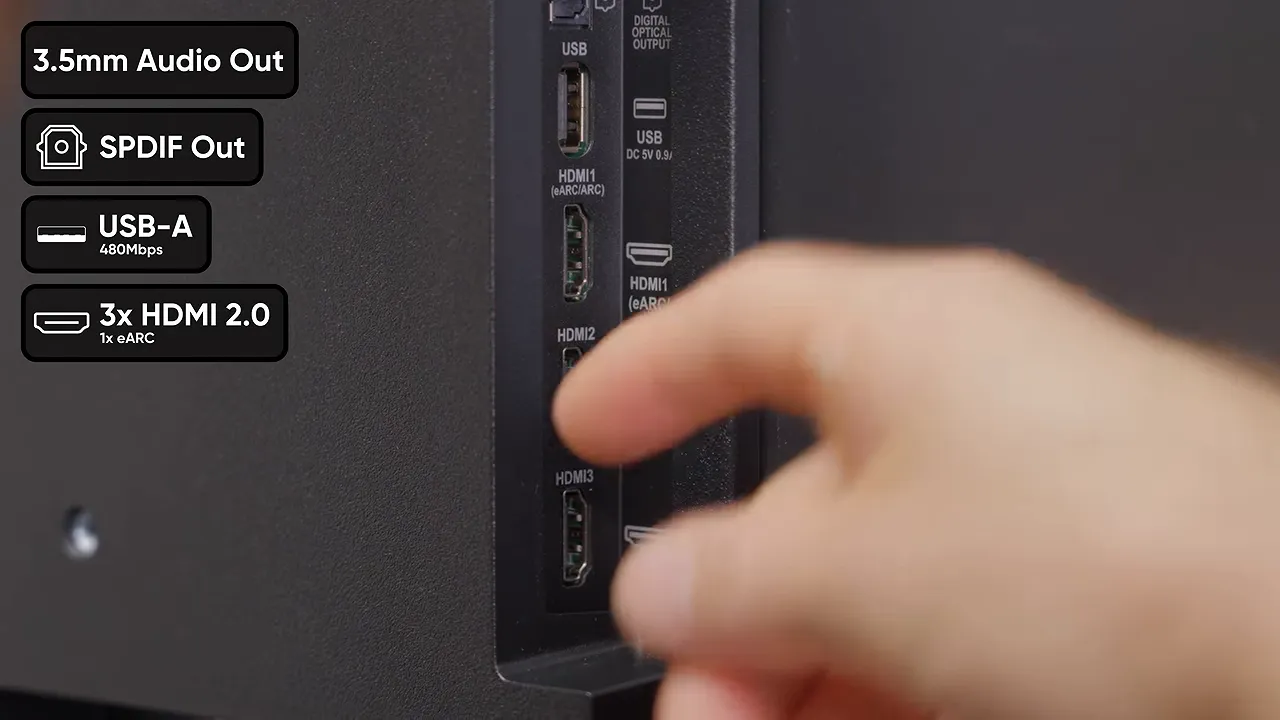
There are thoughtful little touches on the back, too, including M6 mounting-screw information, suggested screw length, and recycling resources.
Even the power connector turned out to be better than one frustrated customer review suggested. It’s tucked into the angled upper surface of a recess rather than the flat surface you might instinctively check. Once you find it, the angle actually makes plugging in the cable easier. An unusual location is not necessarily a bad location.
Fire TV Works, but It Likes to Take Its Time
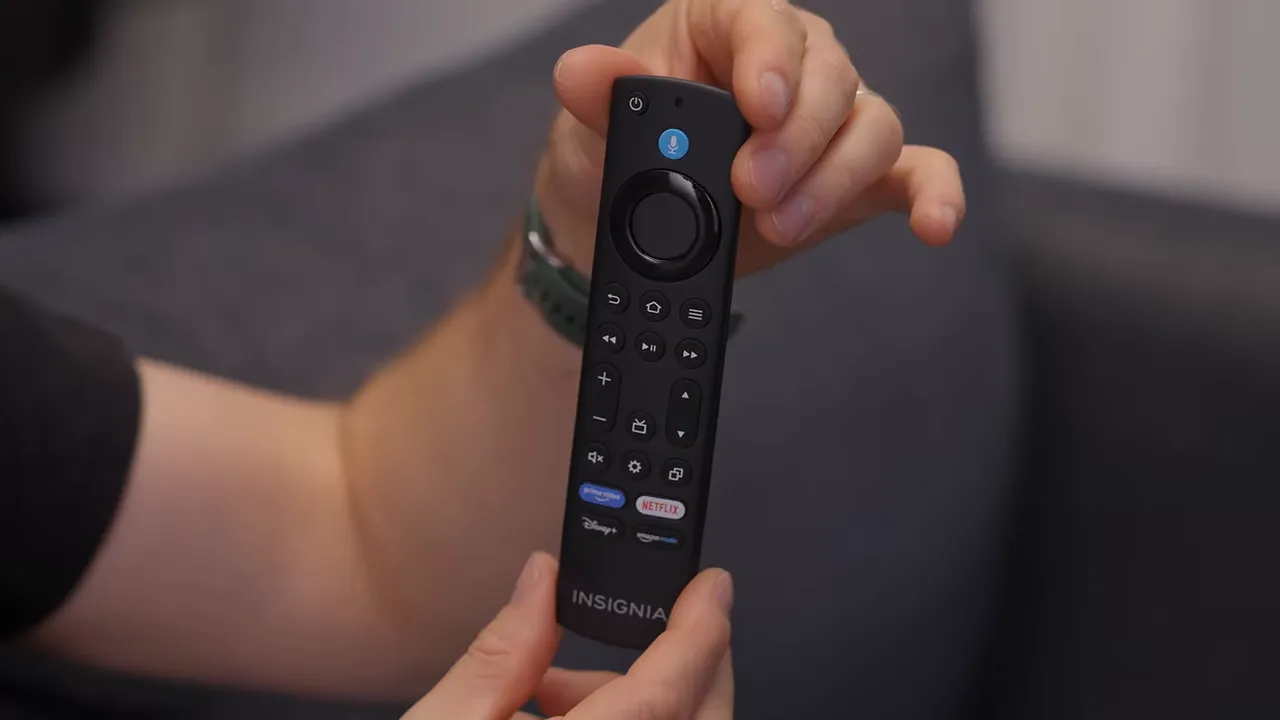
The remote covers most of the basics, but it’s missing a dedicated input button. That remains irritating on a television with three HDMI ports. If your main source is a console or external streaming box, switching inputs should not feel like an activity the manufacturer would rather discourage.
Setup also delivers the full smart-TV experience, and I do not mean that entirely as a compliment. Phone-assisted setup requested ongoing location access, and the TV asked about a default payment method before I had even reached the main content interface. Maybe establish a relationship first, Amazon.
There are useful features mixed in with the requests. Parental controls are included, and Fire TV supports separate operating-system profiles, rather than limiting profiles to individual apps such as Netflix. That can make sense on a shared household television with personalized recommendations.
But recommendations and advertising are also a significant part of the interface. If all you want is a screen that starts directly at your chosen source, there is a perfectly reasonable argument for a non-smart TV, like the Sceptre we tested separately.
Is It Really That Slow?
Some customer complaints about sluggishness are justified. During setup, I needed several button presses before the selection appeared to respond. Launching an app could produce a black screen long enough to briefly suggest the television had turned off. Even adjusting the volume sometimes felt delayed.
That said, it wasn’t unusable. Plex’s first launch didn’t take an absurd amount of time, and moving around its interface was generally reasonable. Fire TV is functional here, just noticeably short of snappy. An older Nvidia Shield Pro still makes an awkwardly effective comparison for how responsive a streaming interface can feel.
Ordinary Streaming Is Fine. High-Bitrate Plex Is Another Story.
Our Plex testing exposed a separate limitation: weak onboard Wi-Fi performance. We encountered stuttering and buffering with a stream below 70 Mbps.
That matters if you run your own media server and stream large, high-bitrate files. It is much less concerning for typical Netflix or YouTube use. Once we switched to sufficiently low-bitrate content, playback proceeded without the same buffering trouble.
Don’t confuse slow menus with constant streaming failure. They are different problems, and this TV did a better job playing ordinary streaming content than its occasionally hesitant interface might suggest.
HDR10 Support Is Not the Same as Good HDR
Here’s the biggest specification trap. The Insignia can accept and interpret HDR10 content. That does not mean its panel can reproduce the brightness and dynamic range that make HDR impressive.
This is a direct-lit VA LCD, and our measured brightness topped out at about 257 nits. That is below even Insignia’s modest 300-nit claim.
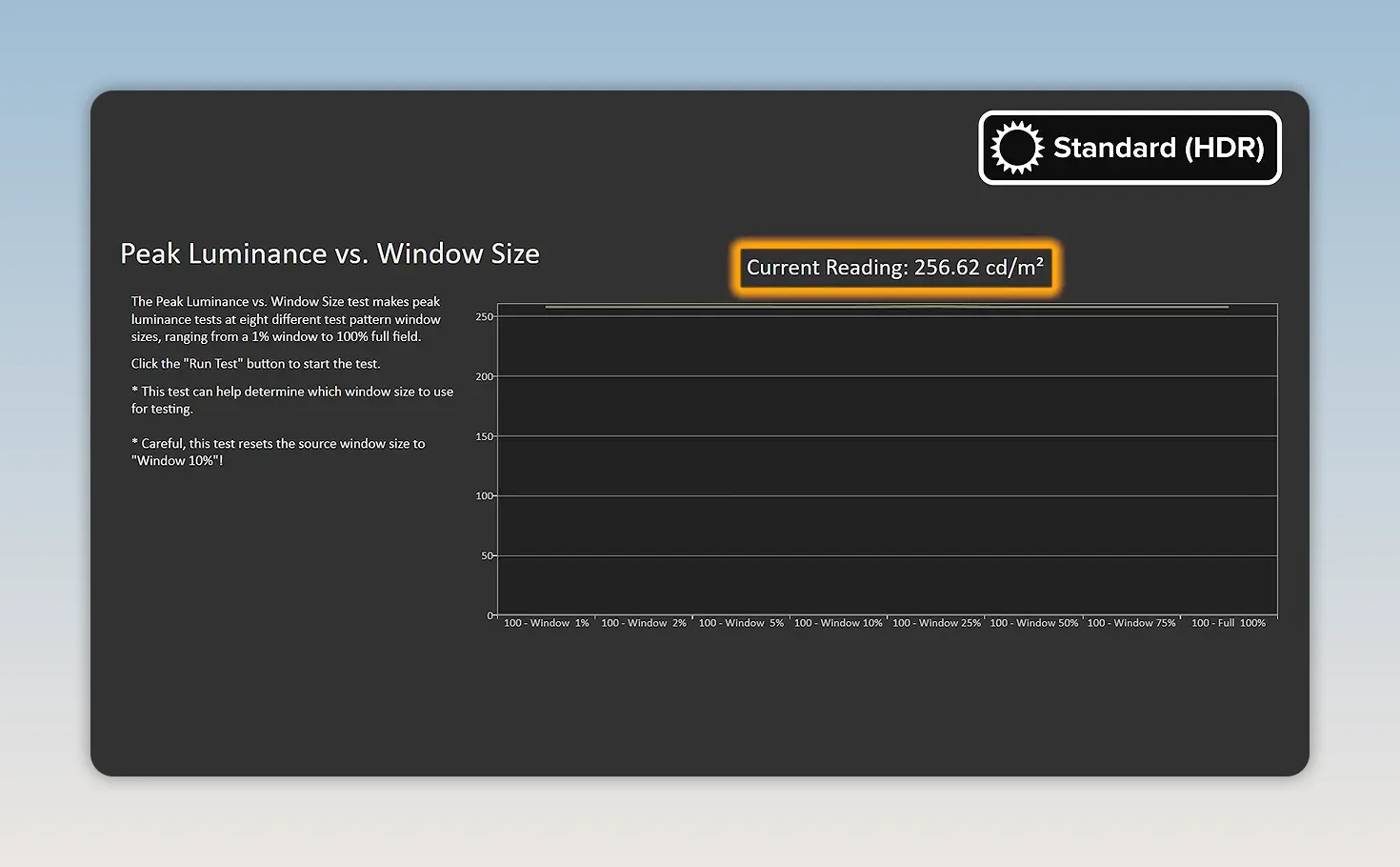
In practice, a window that should look like sunlight is pouring through it looks much less convincing. The signal contains information the display simply cannot reproduce with the intended impact.
Enabling HDR Enhancer doesn’t solve the brightness limitation. What it does improve is tracking of the PQ EOTF curve, which describes how the HDR signal maps to displayed brightness. Put more simply, the TV handles the brightness range it has somewhat more faithfully. It does not magically acquire a brighter backlight.
That distinction matters. Better tone reproduction within a limited range is useful, but it isn’t a substitute for the range itself. Buy this as an inexpensive 4K television, not as an inexpensive route to spectacular HDR.
Room Lighting and Seating Position Matter
Low brightness is also a problem for standard dynamic range content in a bright room. This would not be my choice for a sunny afternoon setup, especially with reflections competing against the image.
The screen’s anti-reflective treatment doesn’t do much to rescue the situation. It is reflective enough that I could clearly see myself in it during darker content. Handy if you misplaced your mirror, less handy during a movie.
Off-axis performance is another limitation. We saw substantial color shifts and brightness loss from the side. If your seating spreads widely across a room, not everybody will get the same picture. Sitting more directly in front of the screen and controlling room light gives this TV a much better chance.
Color Accuracy Is Better Than Expected
Now for a genuinely pleasant surprise: color accuracy.
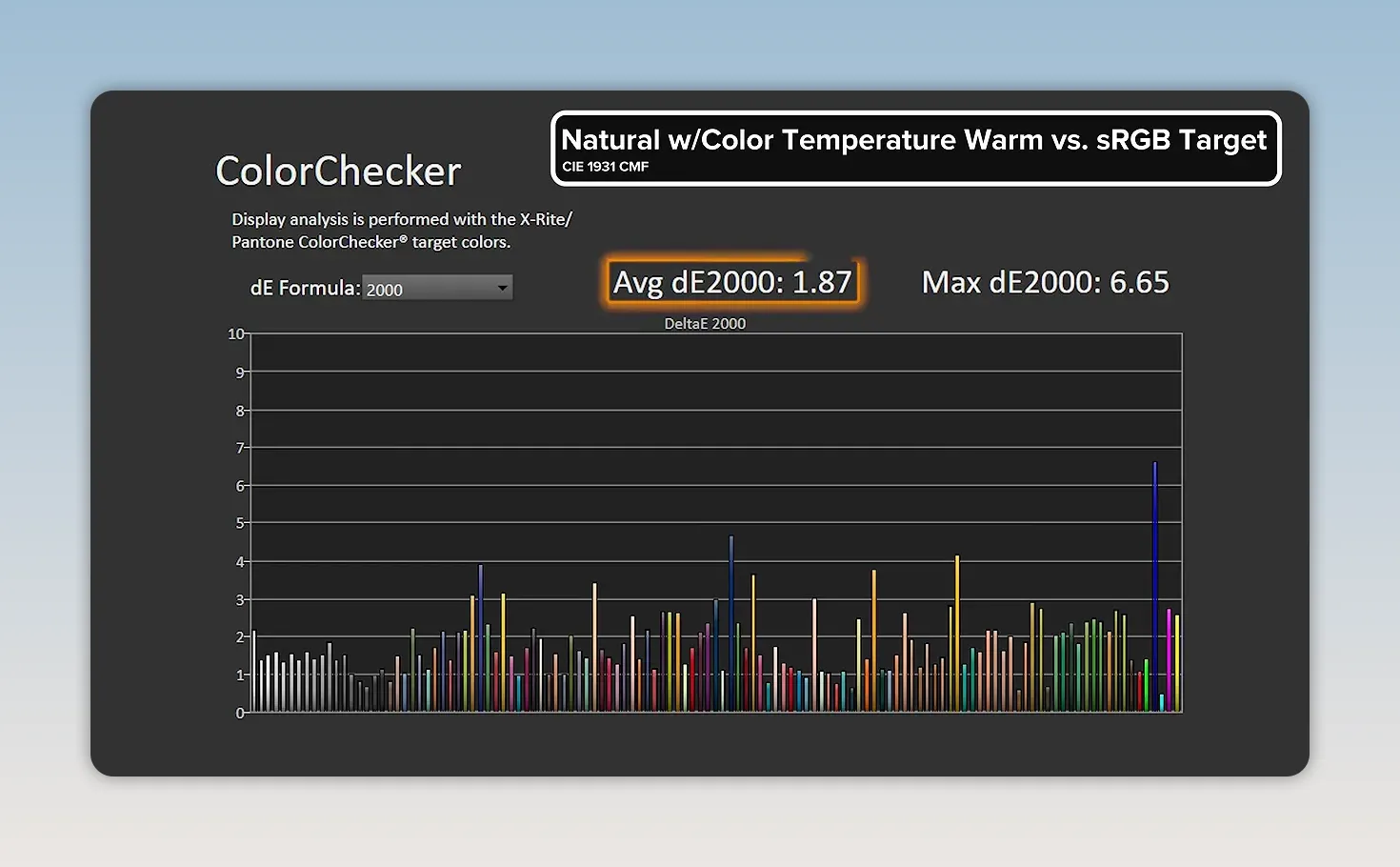
The available color range is limited, at roughly 95% of sRGB, so this isn’t a wide-color-gamut showcase. But within that range, its accuracy was substantially better than I expected from such a cheap display.
- Movie mode: average Delta E 2000 of 2.44, with a maximum of 6.43.
- Natural mode with Warm color temperature: average Delta E 2000 improved to 1.87.
Lower Delta E means less measured color error. These averages show that inexpensive does not automatically mean wildly inaccurate, although the maximum error in Movie mode also reminds us that not every individual color is equally close to the target.
A Picture-Settings Quirk Worth Knowing
Fine-tuning the picture comes with an unnecessary interface annoyance. On the Fire TV home screen, most picture controls are grayed out. You can change the mode and backlight, but the other adjustments remain inaccessible, even after selecting Custom.
You need content running to access those additional controls. The TV offers no useful explanation of that requirement. A simple message would save a lot of confused button pressing.
The Speakers Are Actually Fine for Dialogue
I expected to be more critical of the built-in audio. Instead, spoken dialogue was clear enough that I wouldn’t automatically budget for a soundbar.
I first tried one of my own segments, then switched to Jordan because my voice tends to be fairly easy to understand even through poor speakers. Both came through well.
That is not a claim that the Insignia delivers some incredible cinematic sound experience. It is a narrower, more practical compliment: for understanding people speaking, the built-in speakers did a good job. On a television this inexpensive, avoiding an immediate audio upgrade helps preserve the value proposition.
Gaming: Good Input Lag, Bad Motion Clarity
Connecting a PC briefly raised my hopes when a 75 Hz option appeared. Unfortunately, that didn’t work at the television’s native resolution. For native 4K use, we settled on 60 Hz.
The TV is advertised with automatic low-latency behavior across its Standard, PC, and Game modes, but our actual measurements make one thing clear: select Game mode yourself and verify it is active.
- Standard mode: 63.8 ms of input latency.
- PC mode: 43.2 ms.
- Game mode: approximately 10.1 ms.
Standard feels sluggish, and PC mode is still far from good. Game mode, however, is genuinely respectable for a 60 Hz display.
Here’s the reasoning behind that assessment. A 60 Hz refresh cycle takes about 16.67 ms. In our simplified fixed-refresh timing explanation, a frame arriving at a random point in that cycle could wait anywhere from almost nothing to nearly a full cycle for the next refresh. The midpoint is about 8.33 ms. A result around 10 ms is only a couple of milliseconds above that reference.
There is a catch, though, and it is a big one: input lag and pixel response time are not the same thing. RTINGS’ input-lag testing guide is useful background on this distinction.
Fast Reactions Don’t Guarantee a Sharp Moving Image
Input lag describes the delay before the display responds to an input. Pixel response time concerns how quickly pixels change from one color state to another. This Insignia can do reasonably well at the first in Game mode while doing very poorly at the second.
In Doom, stationary scenes looked sharp. The native 4K resolution was clearly doing useful work. Start moving the camera, however, and fine detail smeared away. Grass that resolved into individual blades while still became a green blur in motion.
Slow transitions are a familiar weakness of VA panels, and this particular display handles them poorly. Aggressive overdrive can come with its own artifacts, so it is not a consequence-free cure either.
Doom is a punishing example because fast camera movement makes poor motion handling especially obvious. Still, the lesson applies beyond that one game: a low input-lag number alone does not make a great gaming display.
So, Is This Insignia TV Worth Buying?
At the $179.99 we paid, yes. With realistic expectations, I’m perfectly happy with what it delivers.
You get a large, sharp 4K image, usable streaming software, surprisingly good color accuracy, clear dialogue, and a practical selection of connections. In exchange, you accept limited brightness, underwhelming HDR, narrow viewing angles, reflections, hesitant menus, and poor motion clarity.
The customer feedback we read broadly fits that picture. Many of the harshest complaints appeared to involve defective units, although that is an impression from reading reviews, not a measured failure rate. The majority were much more positive about getting a cheap television that is easy enough to use and does the job.
Price is doing a tremendous amount of work here. I would be much less forgiving of these compromises on a more expensive model. At roughly $180, they explain the cost rather than invalidate the product.
Insignia’s wider range also included an 85-inch option around the $600 mark at the time, although that is a separate model, not something our 55-inch test results automatically cover.
What I appreciate most is the broader trend this represents. While plenty of other things have become dramatically more expensive, inexpensive displays have become impressively capable. A low-end television today can deliver far more than similarly priced options from five or ten years ago.
So the popularity isn’t much of a mystery. This isn’t a premium TV hiding behind a budget price tag. It’s a budget TV with enough strengths, and a low enough price, that its compromises make sense. Ten thousand purchases suddenly seems a lot less surprising.
Sponsor: Setting Boundaries for AI Tools
ThreatLocker sponsored our testing coverage. As organizations introduce AI agents that can execute commands, access systems, and connect to cloud services, those capabilities also create security risks.
ThreatLocker’s zero-trust approach is designed to block unauthorized applications and scripts, restrict what trusted applications can interact with, and limit what AI agents are permitted to do. Its guide to applying ThreatLocker to agentic AI tools provides practical context for setting those boundaries.


