You buy a dash cam for one very simple reason: when something goes wrong, you want evidence. Ideally, that evidence includes the license plate of the person who just hit you. Not a vague impression of a rectangle that might once have contained letters.
So we spent more than $1,000 US on a dozen popular dash cams, including highly rated Amazon bestsellers and expensive flagship models. Surely one of them would deliver a massive improvement over the cheap stuff?
Well. About that.
Our testing revealed some worthwhile budget options, plenty of disappointing image quality, and a surprisingly small pool of hardware underneath all those different brand names. A higher price often bought more features, not dramatically better evidence.
The models and prices below reflect our 2022 comparison, rather than a survey of current dash cams. But the central buying lesson is worth understanding: resolution labels, star ratings, and premium branding are no substitute for real footage.
Key Takeaways
- Higher dash cam prices often bought extra features rather than dramatically better image quality.
- The Thinkware F70 and Viofo A119 V3 were our strongest value recommendations in this comparison.
- Shared image sensors did not guarantee matching results because processing hardware and software also mattered.
- Documenting an accident was easier than reliably capturing readable license plates in difficult conditions.
Table of Contents
- Why Buying a Dash Cam Is Such a Mess
- The Budget Benchmark: Thinkware F70
- The Cheap Alternatives: Saving Ten Dollars Can Cost a Lot of Detail
- Does Spending $100 to $120 Fix the Image Quality?
- What Happens When You Blow the Budget?
- Why So Many Dash Cams Produce Similar Footage
- What We Would Actually Buy
Why Buying a Dash Cam Is Such a Mess
This started when my wife came across examples of blatant insurance fraud being stopped by dash cam footage. She asked me to get cameras for our cars. Easy enough, right?
Then I opened Amazon.
The choices were a delightful combination of expensive products, contradictory specifications, and suspicious reviews. I eventually bought two inexpensive cameras with decent ratings. Neither even powered on. Excellent start.
A few years later, one of our writers volunteered to investigate. After two weeks of research and testing, we had a much clearer picture of why shopping for these things is so frustrating.
Dash cams combine the difficulty of evaluating a camera with an entire second checklist of practical concerns:
- Parking mode: What can it record when the car is parked?
- Discreetness: How much space does it occupy on the windshield?
- Loop recording: How does it manage ongoing recordings?
- G-sensors: What impact-detection features does it offer?
- Mounting: Is installation secure and straightforward?
- Power cable length: Can it reach the power source without leaving a huge coil of wire to hide?
- Software: Does getting useful functionality require an app and an account?
And after all that, you still need to know whether it captures anything useful at night. Comparing marketing pages will only get you so far.
There is some good news: recording enough context to establish fault is a much easier job than reliably identifying a moving license plate. A modest camera can still show the vehicles, people, and events involved in an accident. That distinction matters throughout this comparison.
The Budget Benchmark: Thinkware F70
Our value pick was the Thinkware F70, at about $70 US.
It is bare-bones. There is no GPS data and no screen. On the other hand, setup does not require pairing it with an app, which is a feature in its own right as far as I am concerned.
The included 3M mounting tape holds firmly enough that you should treat its placement as fairly permanent. Image quality will not win awards, but we could clearly identify vehicles and people. We could even make out license plates on stationary cars.
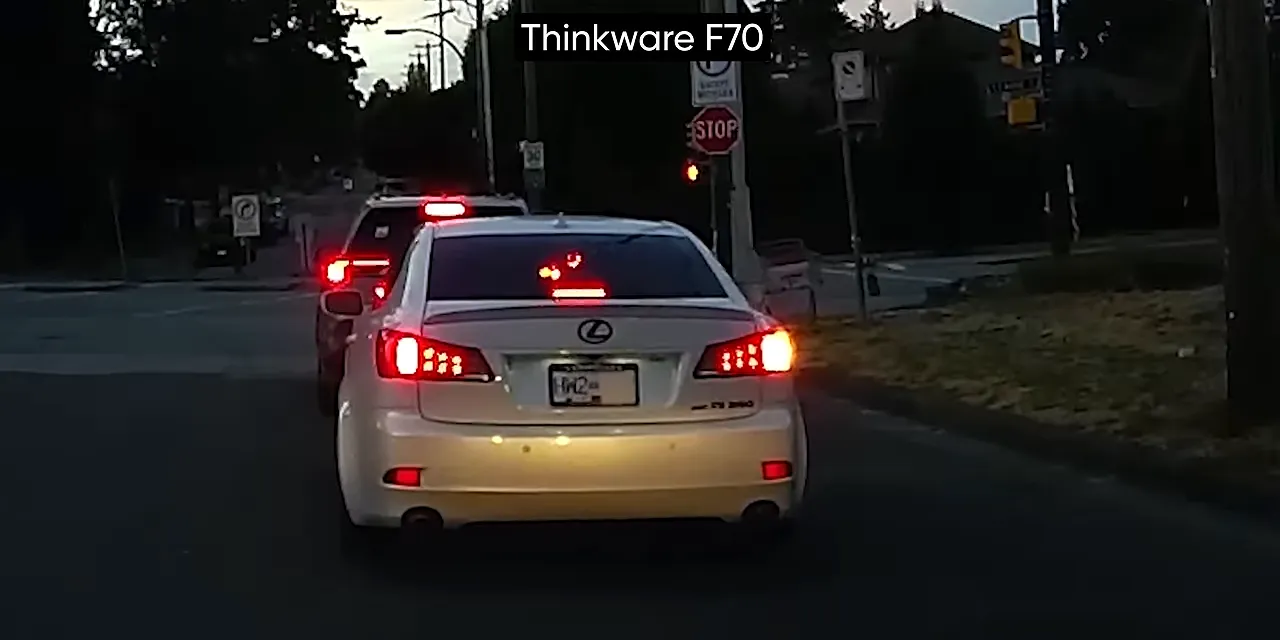
For $70, that is pretty okay. It became the baseline that every more expensive camera had to justify beating.
The Cheap Alternatives: Saving Ten Dollars Can Cost a Lot of Detail
Biuone A20: $60
The Biuone A20 was a prominent Amazon bestseller from a brand for which we could not find a website. At $60, expectations were not exactly sky-high.
Even so, its late-day image quality was disappointing, and nighttime footage was firmly in potato territory. The screen also did not automatically dim, leaving a bright display reminding you how little useful detail it was recording.
Saving $10 over the F70 did not look like a good trade.
Chortau B-T13: $70
The Chortau B-T13 was another popular listing from a brand without an easily discoverable website. Daylight footage looked grainier than the Biuone’s, although text was slightly easier to read.
That is an important distinction: a cleaner-looking image is not necessarily a more informative one. We suspected differences in the sensor or image processing, but the footage alone could not establish the exact cause.
At night, the Chortau performed so poorly that the Biuone looked relatively decent beside it. Its screen also stayed on by default.
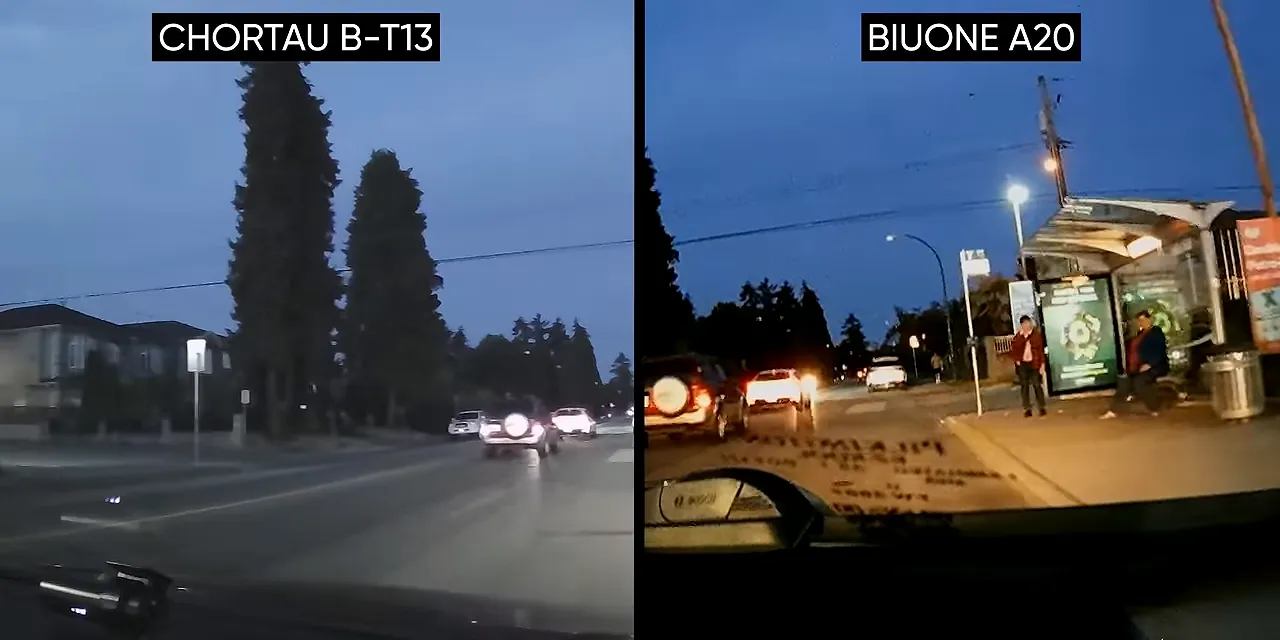
One unusual detail was the mini HDMI connector used for its rear-camera input. That raised an interesting possibility of experimenting with another camera as an input, but it was not a compelling reason to buy the Chortau as a normal dash cam. At this price, we would still take the F70.
Iiwey T1 and Pruveeo D30H: Around $80
These two were bulky enough that they did not make it into our simultaneous side-by-side setup. Both included cabin-facing cameras, making their designs more relevant to rideshare drivers than someone looking for a discreet forward-facing recorder.
The Iiwey T1 struggled even in broad daylight while driving away from the sun. Those are favorable conditions, yet many road signs remained unreadable. Not an encouraging result.
The Pruveeo D30H did better with signs, but license plates were still difficult unless the car was stopped and positioned just right. It was advertised as a 4K camera, while the files it produced out of the box identified themselves as 1080p. That does not establish what every available setting could do, but it certainly undermines the promise of an effortless 4K experience.
The Pruveeo did have one worthwhile hardware feature: capacitors rather than a lithium battery.
Heat and prolonged time at full charge accelerate lithium-battery wear. In a hot car, that can lead to swelling and, in extreme cases, fire. Capacitor-based designs are therefore worth considering, even though that feature does not magically improve the footage.
Does Spending $100 to $120 Fix the Image Quality?
Rexing V1-4K: $100
The Rexing V1-4K had a promising name and a favorable budget recommendation from Forbes. And, to be fair, its footage was not terrible.
Around dusk, it was slightly clearer than the F70. Slightly.
Field of view, colors, and the ability to make out text were broadly similar. Unless you specifically wanted its screen, spending roughly 43 percent more than the F70 was difficult to justify on image quality alone.
Garmin Dash Cam Mini 2: $110
The Garmin Dash Cam Mini 2 pushed beyond our original sub-$100 target, but it was compact and came from a recognizable company.
Its image quality was broadly comparable to the Rexing, sometimes better and sometimes worse depending on the conditions. That made it neither a disaster nor the breakthrough we were hoping for.
Garmin also offered useful features through its app. Unfortunately, the app required an account, which meant providing Garmin with personal information. If you want a simple recorder without another login, that is a meaningful usability trade-off.
Rove R2-4K: $120
Surely Amazon’s number-one pick would save the day?
Nope.
At dusk, the Rove R2-4K captured less detail than our $70 F70. At night, the pattern continued, with road signs readable only some of the time. Being popular did not make it better, and having “4K” in the name did not make its footage more useful.
Viofo A119 V3: $100
The Viofo A119 V3 finally gave us a stronger option at our target price.
It offered genuine 1440p recording, straightforward and secure mounting, and a manufacturer that engaged with community feedback and maintained its products through firmware updates.
More importantly, it delivered the best image quality we had seen among these budget contenders, especially in fine detail. It also cost $20 less than the Rove.
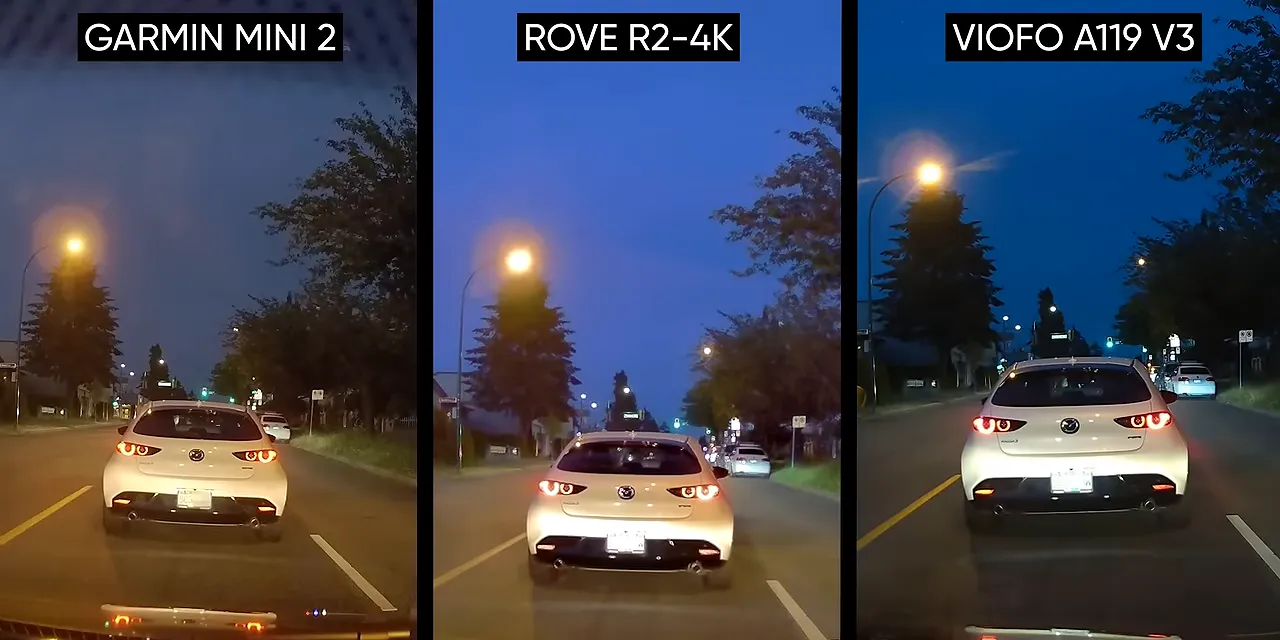
That earns it a recommendation, not a standing ovation. Even our best budget camera still left us wishing the category could do substantially better.
What Happens When You Blow the Budget?
To find out whether money really could solve this problem, we stepped up to the BlackVue DR750X Plus and Thinkware U1000.
The BlackVue cost about $270 for a single-channel configuration and offered:
- Dual-band Wi-Fi.
- A back-illuminated image sensor with enhanced night-vision claims.
- Support for LTE cloud backup through an optional connectivity module.
The Thinkware U1000 was a roughly $400 flagship with a 150-degree viewing angle, a 1440p recording option at 60 frames per second, geofencing with push notifications, and red-light-camera alerts.
Those are real features. Geofencing could be useful when your kids start driving. Cloud backup could matter if the recorder is destroyed in a crash. There are legitimate reasons someone might pay for them.
But the footage? The BlackVue was disappointingly comparable to much cheaper cameras. The U1000 was barely better than the A119 V3, if at all in the scenes we compared.
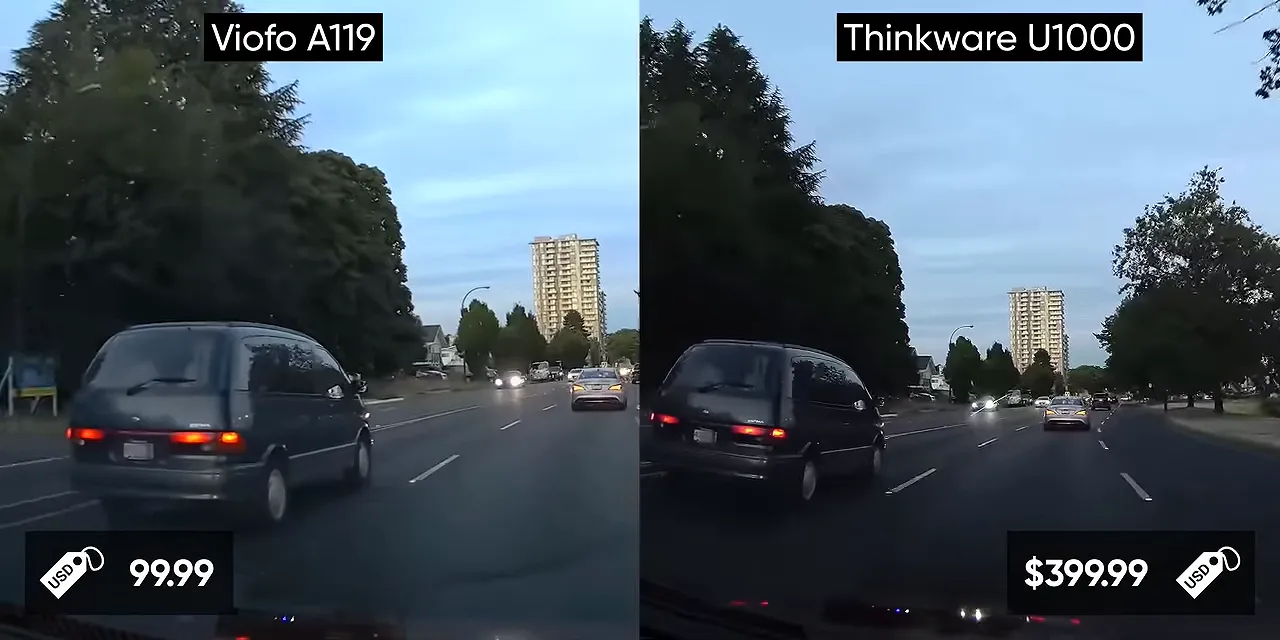
At double, triple, or quadruple the price, I expected a colossal improvement in the basic job of recording what was happening through the windshield. Instead, we mostly got more surrounding functionality.
A $400 action camera can produce impressive-looking video. That makes the limitations here especially frustrating, although this comparison does not establish an action camera as a drop-in replacement for a dedicated dash cam.
Why So Many Dash Cams Produce Similar Footage
Look at a windshield full of different dash cams and you might think you are seeing a diverse collection of camera technology.
Look closer, and the similarities start piling up: familiar startup sounds, matching default folder structures, and suspiciously similar rear-camera accessories.
There may be hundreds of dash cam brands, but far fewer companies supply the two components central to their imaging capabilities:
- The system-on-chip, or SoC: The processor responsible for handling the camera’s image data and recording functions.
- The CMOS image sensor: The component that captures the incoming light.
A Small Pool of Processors
Novatek, the Taiwanese semiconductor company, was the dominant processor supplier in our budget group. Its business includes display controllers, but it also makes camera SoCs such as the NT96660 and NT96655.
Public information about those chips was frustratingly limited. Our research suggested that the NT96660 dated to around 2017 or earlier. The numbering appeared to indicate series and revisions, but without clear documentation, it was not a dependable guide to specifications or age.
The A119 V3 used an NT96670, one of the comparatively newer-looking Novatek parts we found. Many competing cameras appeared to rely on older platforms.
Shared startup sounds, bundled cameras, and folder names containing “Novatek” can provide clues about a device’s underlying platform. They are not, by themselves, a complete hardware identification.
Other suppliers included HiSilicon, Ambarella, which Thinkware used, and the less frequently encountered Allwinner. We could not establish the processor suppliers for Garmin and BlackVue through our limited research.
The takeaway is not that every camera contains exactly the same electronics. It is that the range of distinct imaging platforms is much narrower than the number of brands suggests.
Sony Sensors Are Everywhere, Too
Sony’s STARVIS sensors were extremely common in the cameras we investigated. STARVIS is associated with Sony’s Exmor sensor family and is designed for security and related applications where low-light performance matters. Sony provides more background on its security-camera image sensor technology.
The IMX335 was a common example, capable of producing useful 1440p footage with reasonable low-light clarity. Both the Rove R2-4K and Viofo A119 V3 used it.
Same sensor, same image quality, right?
Clearly not.
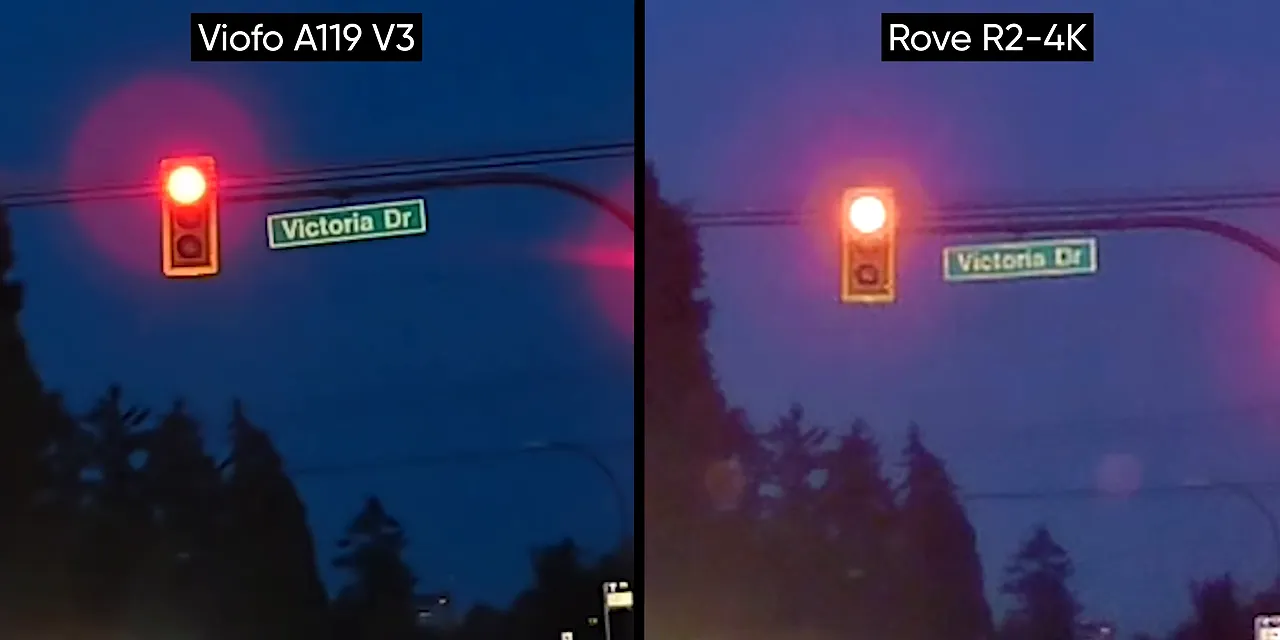
Possible explanations included differences in processing hardware, image-processing software, and the Rove’s upscaling to a 4K output. We could not isolate the contribution of each factor, so those remain explanations rather than proven causes.
The Thinkware U1000 used Sony’s IMX334, a higher-tier sensor than the IMX335 in this comparison. Despite the confusing model numbers, that was a hardware step up. It just did not translate into a similarly dramatic improvement in our footage.
In PC terms, it felt like paying double or triple to move from an RTX 3070 to a 3070 Ti. Yes, there is a difference. No, that does not make the price jump good value.
Other image-sensor suppliers, including OmniVision and GalaxyCore, existed in this market too. The other reviews we found did not suggest they offered an obvious escape from these image-quality limitations.
A Sensor Specification Is Only Part of the Answer
Sony’s public sensor documentation makes it possible to learn something useful about the hardware inside a dash cam. But a sensor datasheet cannot tell you exactly what the finished product will record.
The sensor, processor, and image-processing software work together. Knowing one component does not reveal the quality of the whole system.
That is why “Sony sensor” and “4K recording” are not sufficient buying criteria. The footage is the result that matters, especially the small details you would need after an incident.
What We Would Actually Buy
For the cameras in this comparison, the recommendations were refreshingly simple:
- Lowest-cost sensible choice: Thinkware F70. Around $70 bought simple setup and useful footage for documenting an incident.
- Best choice for most people: Viofo A119 V3. Around $100 delivered stronger fine detail, secure mounting, and ongoing firmware support.
- For front and rear recording: A compatible dual-camera model such as the Viofo A129 Plus Duo offered an affordable route to broader coverage.
- For premium features: Pay more only if capabilities such as cloud backup, geofencing, or expanded camera support solve a specific problem for you.
The cheaper recommended models also avoid putting an especially expensive piece of equipment on display in your car. Discreetness is worth considering alongside the feature list.
The larger frustration is where the category directs its effort. Multi-camera expansion and detailed sensor readouts can be useful, but I would happily trade some feature-list excitement for a camera that could consistently read the plate right in front of me.
If you want to explore the testing further, the dash cam comparison discussion provides a place to dig into the findings.
A dash cam can be worth buying. Spending several times more because you assume it must capture several times more detail is the part to question. Start with the evidence you need, compare real footage, and pay for features deliberately. Your wallet does not need to be the crash-test dummy.


